
Samsung Gear 2 Speaker Replacement

Devin Mast and 4 other contributors
Last updated on Jul 31, 2026
Views: 4.8K
View statistics:
- Past 24 Hours:
- 2
- Past 7 Days:
- 24
- Past 30 Days:
- 99
- All Time:
- 4,838
Comments: 7
4 comments on steps, 3 guide comments.
Go to guide commentsCompleted: 4 5
4 people have marked this guide "completed." Will you be next?
5 people have marked this guide "completed." Including you — great job!
Favorites: 3 4
3 people have favorited (and subscribed to) this guide. Will you be next?
4 people have favorited (and subscribed to) this guide — including you!
Introduction
Go to step 1 ↓This guide will walk you through the process of replacing a broken or defective speaker in a Samsung Gear 2.
What you need
Tools
-
-
Spudger4.9


-
-
-
To remove each strap, locate the metal latches on both sides of the back of the Gear.
-
Press down on the metal latch while pulling the strap away from the Gear until it is completely off.
 Ask FixBot
-
-
-
Remove the four 4.0 mm screws on the back of the Gear using a T5 Torx Screwdriver.
-
-
-
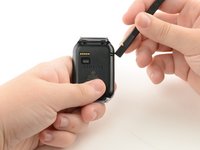
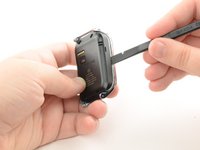
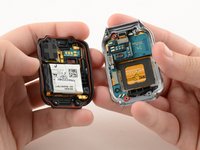
Firmly holding the Gear, insert the flat side of the spudger at an angle to pry the back casing off of the device. Move the spudger along the sides of the Gear to completely detach the back and front components.
-
Pry the device open from the other side also if it does not fully disassemble from one side.
-
-
-
-
-
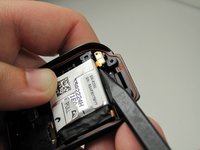
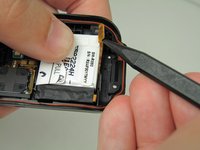
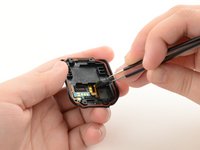
Use the pointed side of the spudger to remove the small, orange battery cable.
-
-
-
-
-
Tool used on this step:Tweezers$4.99
-
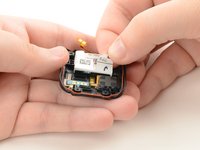
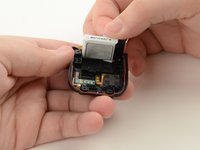
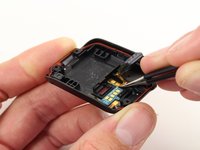
Using tweezers, lift the rectangular speaker from the case.
-
-
-
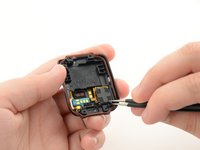
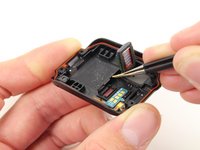
Use tweezers to carefully grab the connector.
-
Gently pull upwards to detach it from the case and from the adhesive.
-
-










To reassemble your device, follow these instructions in reverse order.
Cancel: I did not complete this guide.
4 other people completed this guide.

Team

Cal Poly, Team 13-27, Maness Spring 2014 Member of Cal Poly, Team 13-27, Maness Spring 2014
CPSU-MANESS-S14S13G27
4 Members
72 Guides authored
3 Guide Comments
what happens if I don't put the speakers back?
Where can I buy the speaker?
