
Samsung Gear 2 Camera Replacement

Allison Michel and
Last updated on Jul 31, 2026
Views: 4.5K
View statistics:
- Past 24 Hours:
- 4
- Past 7 Days:
- 22
- Past 30 Days:
- 117
- All Time:
- 4,460
Comments: 3
2 comments on steps, 1 guide comment.
Go to guide commentsCompleted: 2 3
2 people have marked this guide "completed." Will you be next?
3 people have marked this guide "completed." Including you — great job!
Favorites: 7 8
7 people have favorited (and subscribed to) this guide. Will you be next?
8 people have favorited (and subscribed to) this guide — including you!
Featured Student Guide
This guide has been the hard work of our awesome students and is found to be exceptionally cool by the iFixit staff.
What you need
Tools
-
Spudger4.9
-


Introduction
Go to step 1 ↓This guide will walk you through the process of replacing a broken camera in a Samsung Gear 2.
-
-
-
To remove each strap, locate the metal latches on both sides of the back of the Gear.
-
Press down on the metal latch while pulling the strap away from the Gear until it is completely off.
 Ask FixBot
-
-
-
Remove the four 4.0 mm screws on the back of the Gear using a T5 Torx Screwdriver.
-
-
-
-
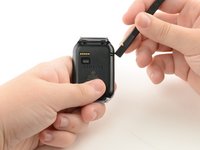
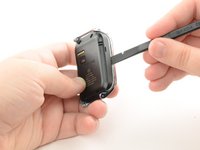
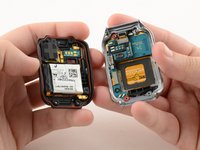
Firmly holding the Gear, insert the flat side of the spudger at an angle to pry the back casing off of the device. Move the spudger along the sides of the Gear to completely detach the back and front components.
-
Pry the device open from the other side also if it does not fully disassemble from one side.
-
-
-
-
Tool used on this step:Tweezers$4.99
-
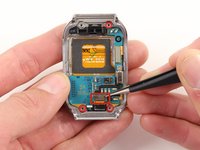
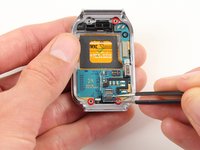
Locate the rectangular metal connector that attaches the camera to the Gear.
-
Use tweezers to gently lift and detach the metal plate of the connector.
-
-





To reassemble your device, follow these instructions in reverse order.
Cancel: I did not complete this guide.
2 other people completed this guide.

Team

Cal Poly, Team 13-27, Maness Spring 2014 Member of Cal Poly, Team 13-27, Maness Spring 2014
CPSU-MANESS-S14S13G27
4 Members
72 Guides authored
