Introduction
If the front camera of your Samsung Galaxy Tab A8 doesn't seem to be functioning properly, use this guide to replace the camera. Before doing so, be sure to troubleshoot your camera to eliminate any other causes and also possibly remove the need for replacement.
The front camera is a nice accessory for taking photographs of yourself and similar shots. It's what most would call a "selfie". :)
The camera may become unresponsive due to lag, battery failure, or software issues. It can also cease to function completely if sufficiently damaged, scratched, or waterlogged. It may also simply be blurry due to contaminants such as fingerprints. Make sure to clean your camera and update your software before attempting replacement. If these issues continue to persist, then the following steps will guide you in replacing your front camera.
What you need
-
-
-
Fully power off the device.
-
Orient the screen so it is face-up.
-
Apply anti-clamp or other suction device to apply constant upward force on the screen.
-
Heat the screen to soften the adhesive with a heat gun or blow dryer. Be sure to heat all sides as evenly as possible.
 Ask FixBot
-
-
-
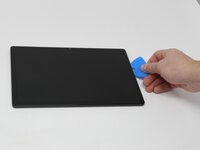
Use plastic opening picks, or a Jimmy if necessary, to remove the adhesive and get under the screen.
-
Using the plastic opening picks, move around the screen slowly, one corner at a time. Every few inches, leave an additional opening pick behind where you are working to hold the screen open while continuing to remove the adhesive.
-
-
-
Continue to pry the screen off with the opening picks, using additional tools if more leverage is required.
-
-
-
-
Using a Phillips #000 screwdriver, remove the 1.8mm screw holding the clamp that holds the screen ribbon in place.
-
Remove the battery connector ribbon to help prevent short circuiting of the device and/or shock hazards.
-
-
-
Disconnect the screen ribbon wire connector.
-
Remove the screen from the tablet.
-
-
-
-
-
Remove the four 1.8mm screws using a Phillips #000 screwdriver.
-
Remove the bracket to gain access to the front camera.
-
-




To reassemble your device, follow these instructions in reverse order.
Cancel: I did not complete this guide.
One other person completed this guide.

Team

Utah Tech University, Team 1-3, McMurrin Fall 2025 Member of Utah Tech University, Team 1-3, McMurrin Fall 2025
UTAHTECH-MCMURRIN-F25S1G3
3 Members
60 Guides authored
