Free Shipping on Domestic Orders $75+

Samsung Galaxy S4 MicroSD Card Replacement

What you need

  1. Samsung Galaxy S4 MicroSD Card Replacement, Rear Case: step 1, image 1 of 2 Samsung Galaxy S4 MicroSD Card Replacement, Rear Case: step 1, image 2 of 2
    • Pry with a plastic opening tool, or your fingernail, in the divot to the left of the rear-facing camera, near the power button.

    Ask FixBot

    Add Comment

  2. Samsung Galaxy S4 MicroSD Card Replacement: step 2, image 1 of 3 Samsung Galaxy S4 MicroSD Card Replacement: step 2, image 2 of 3 Samsung Galaxy S4 MicroSD Card Replacement: step 2, image 3 of 3
    • Lift the rear case by the corner nearest the divot and remove it from the phone.

    Ask FixBot

    Add Comment

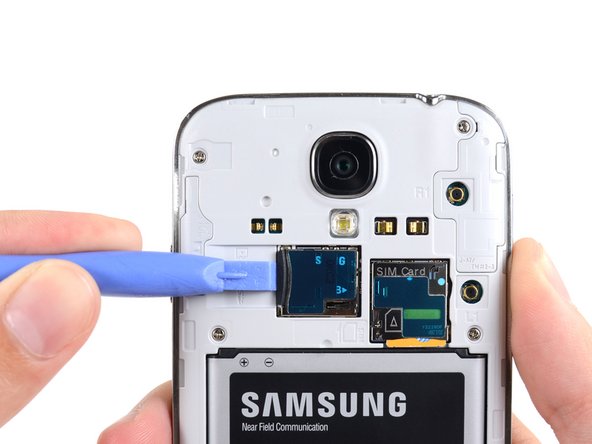
  3. Samsung Galaxy S4 MicroSD Card Replacement, MicroSD Card: step 3, image 1 of 3 Samsung Galaxy S4 MicroSD Card Replacement, MicroSD Card: step 3, image 2 of 3 Samsung Galaxy S4 MicroSD Card Replacement, MicroSD Card: step 3, image 3 of 3
    • Use the flat end of a spudger, or your fingernail, to press the microSD card slightly deeper into its slot until you hear a click.

    • After the click, release the card and it will pop out of its slot.

    • Remove the microSD card.

    • For reassembly, push the microSD card into the slot until it clicks in place.

    Ask FixBot

    Add Comment

Conclusion

To reassemble your device, follow these instructions in reverse order.

Cancel: I did not complete this guide.

29 other people completed this guide.

Sam Goldheart

Member since: 10/18/12

477,603 Reputation

538 Guides authored

Team

iFixit Member of iFixit

Staff

122 Members

26,591 Guides authored

1 Guide Comment

If you use Micro SD card the you must know to How to Recover Memory Card

we are not going to use any app/softwares we only use CMD and 5 exclusive methods

http://www.gogorapid.com/how-to-recover-...

Ramal jayaratna - Reply Share

Add Comment

View Statistics:

Past 24 Hours: 0

Past 7 Days: 29

Past 30 Days: 82

All Time: 88,832