Free Shipping on Domestic Orders $75+

Samsung Galaxy S25 Edge SIM Card Tray Replacement

What you need

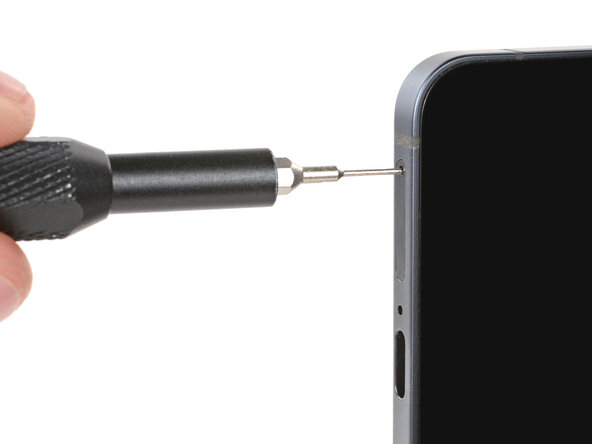
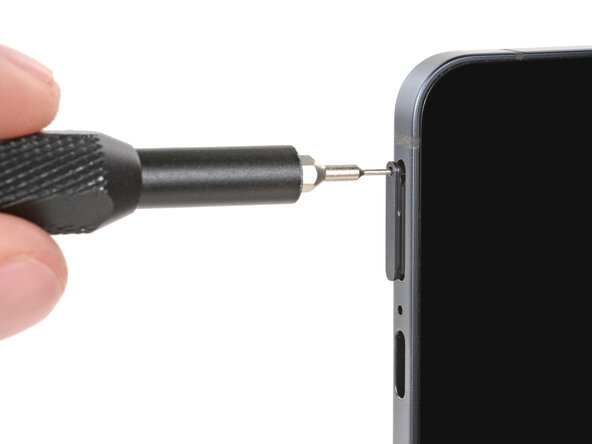
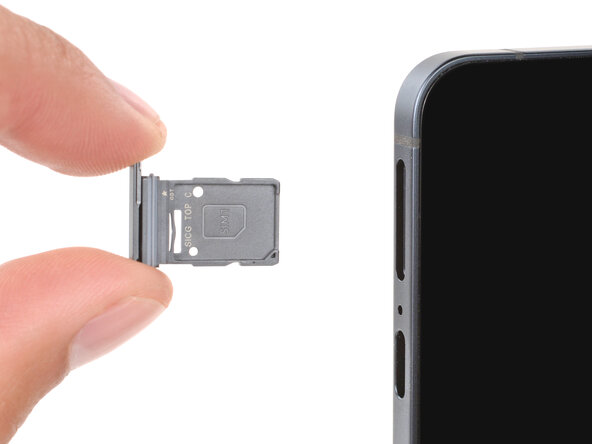
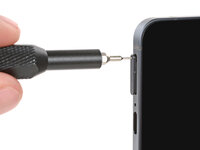
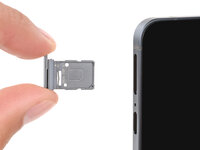
  1. Samsung Galaxy S25 Edge SIM Card Tray Replacement, Remove the SIM card tray: step 1, image 1 of 3 Samsung Galaxy S25 Edge SIM Card Tray Replacement, Remove the SIM card tray: step 1, image 2 of 3 Samsung Galaxy S25 Edge SIM Card Tray Replacement, Remove the SIM card tray: step 1, image 3 of 3
    Tool used on this step:
    iFixit Precision 4 mm Screwdriver Bit
    $2.99
    Buy
    • Insert a SIM eject tool, SIM eject bit, or straightened paperclip into the SIM card tray hole on the bottom edge of your phone.

    • A small mic hole is next to the SIM tray—don't confuse the two!

    • Firmly press the SIM eject tool into the hole to eject the SIM card tray.

    • Remove the SIM card tray.

    • When reinserting the tray, make sure the hole is on the left side before firmly pushing the tray into place.

Conclusion

Repair didn’t go as planned? Try some basic troubleshooting, or ask our Answers Community for troubleshooting help.

Spencer Day

Member since: 09/14/22

187,297 Reputation

1,187 Guides authored

0 Guide Comments

Add Comment

View Statistics:

Past 24 Hours: 5

Past 7 Days: 14

Past 30 Days: 31

All Time: 293