Free Shipping on Domestic Orders $75+

Samsung Galaxy Note 3 Headphone Jack Replacement

What you need

    1. Samsung Galaxy Note 3 Headphone Jack Replacement, Remove the rear case: step 1, image 1 of 1
      • Insert a fingernail or plastic opening tool in the gap between the rear case and the base of the phone.

      Ask FixBot

      Add Comment

    2. Samsung Galaxy Note 3 Headphone Jack Replacement, Remove Case from the Base: step 2, image 1 of 2 Samsung Galaxy Note 3 Headphone Jack Replacement, Remove Case from the Base: step 2, image 2 of 2
      • Slide your fingernail or plastic opening tool along the edge of the rear case.

      • Lift the case gently from the base.

      Ask FixBot

      Add Comment

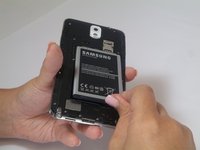
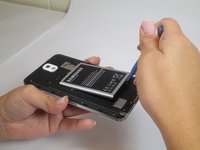
    1. Samsung Galaxy Note 3 Headphone Jack Replacement, Battery: step 3, image 1 of 2 Samsung Galaxy Note 3 Headphone Jack Replacement, Battery: step 3, image 2 of 2
      • Insert a fingernail or plastic opening tool into the small gap between the battery and the phone base.

      • Lift the battery out of its recess.

      Ask FixBot

      Add Comment

    1. Samsung Galaxy Note 3 Headphone Jack Replacement, S Pen: step 4, image 1 of 1
      • Place your fingernail in the groove of the stylus pen.

      • Pull the stylus pen away from the phone.

      Ask FixBot

      Add Comment

    1. Samsung Galaxy Note 3 Headphone Jack Replacement, Unscrew Back Chassis: step 5, image 1 of 1
      • Remove the twelve 4mm Phillips #00 screws from the back chassis.

      Ask FixBot

      Add Comment

    2. Samsung Galaxy Note 3 Headphone Jack Replacement, Remove Back Chassis: step 6, image 1 of 1
      • Insert the plastic opening tool into the Stylus Pen placement holder.

      • Lift the plastic opening tool so that the midframe separates from the base.

      Ask FixBot

      Add Comment

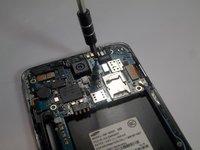
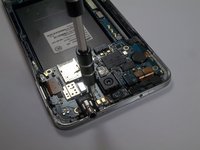
    1. Samsung Galaxy Note 3 Headphone Jack Replacement, Screw Removal: step 7, image 1 of 2 Samsung Galaxy Note 3 Headphone Jack Replacement, Screw Removal: step 7, image 2 of 2
      • Remove the single screw beside headphone jack.

      Ask FixBot

      Add Comment

    2. Samsung Galaxy Note 3 Headphone Jack Replacement, Unfasten Clips and Cable Connectors: step 8, image 1 of 2 Samsung Galaxy Note 3 Headphone Jack Replacement, Unfasten Clips and Cable Connectors: step 8, image 2 of 2
      Tool used on this step:
      Tweezers
      $4.99
      Buy
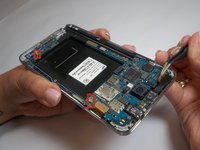
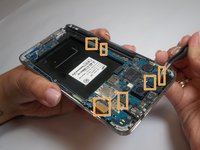
      • Use tweezers to remove both antenna clips.

      • Use a spudger to disconnect six cable connectors.

      Ask FixBot

      Add Comment

    3. Samsung Galaxy Note 3 Headphone Jack Replacement, Motherboard Removal: step 9, image 1 of 1
      • Pull up on the motherboard with tweezers.

      Ask FixBot

      Add Comment

    1. Samsung Galaxy Note 3 Headphone Jack Replacement, Spudger Tool Placement: step 10, image 1 of 1
      • Insert the spudger into the headphone jack.

      Ask FixBot

      Add Comment

    2. Samsung Galaxy Note 3 Headphone Jack Replacement, Lift to Separate Headphone Jack: step 11, image 1 of 1
      • Lift the spudger to separate the jack assembly from the motherboard.

      • Pull to remove.

      Ask FixBot

      Add Comment

Conclusion

To reassemble your device, follow these instructions in reverse order.

Cancel: I did not complete this guide.

24 other people completed this guide.

Brittany Gail

Member since: 09/23/14

8,581 Reputation

7 Guides authored

Team

USF Tampa, Team 2-2, Blackwell Fall 2014 Member of USF Tampa, Team 2-2, Blackwell Fall 2014

USFT-BLACKWELL-F14S2G2

4 Members

84 Guides authored

0 Guide Comments

Add Comment

View Statistics:

Past 24 Hours: 5

Past 7 Days: 25

Past 30 Days: 109

All Time: 15,895