Samsung Galaxy J7 Midframe Replacement

Timothy Grubb and 7 other contributors
Last updated on Jan 10, 2025
Views: 2K
View statistics:
- Past 24 Hours:
- 1
- Past 7 Days:
- 23
- Past 30 Days:
- 79
- All Time:
- 2,013
Comments: 0
No one has left comments on this guide. Will you be first?
Go to guide commentsCompleted: 2 3
2 people have marked this guide "completed." Will you be next?
3 people have marked this guide "completed." Including you — great job!
Favorites: 0 1
No one has favorited (and subscribed to) this guide. Will you be the first?
1 person has favorited (and subscribed to) this guide — and that's you!
Action Shots
Be an action hero! This guide needs images that better demonstrate how to perform specific actions.
Missing Steps
Oops! This guide is currently missing one or more important steps.
Better Introduction
Improve this guide by completing or revising its introduction.
What you need
Tools

-
-
-
Locate the Tab: Find the tab at the top left corner of the back cover. (highlighted by red square)
-
Insert the tool: Use a fingernail or a plastic opening tool to lift the tab gently
-
Pry open the cover: Carefully work around the edges to remove the back cover completely
 Ask FixBot
-
-
-
-
-
Locate the Battery slot: Find the small slit at the bottom right corner of the battery (highlighted by red square)
-
Remove Battery: Gently pop out the edge and carefully pull out the battery.
-
-
-
-
-
-
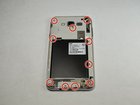
Using the Phillips #000 screwdriver, remove the ten 4.2 mm screws around the edge of the midframe.
-
-
-
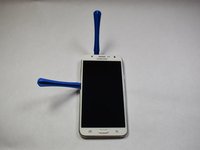
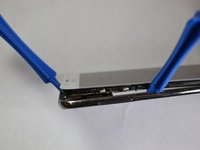
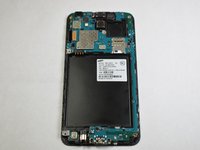
Lift up the back of the device with the iFixit opening tool and disconnect it from the front.
-
-


To reassemble your device, follow these instructions in reverse order.
Cancel: I did not complete this guide.
2 other people completed this guide.

Team

Appalachian State University, Team S2-G5, Menagarishvili Spring 2019 Member of Appalachian State University, Team S2-G5, Menagarishvili Spring 2019
APSU-MENAGARISHVILI-S19S2G5
3 Members
84 Guides authored
