Introduction
The plastic covering over the camera can sometimes crack or break off completely. This guide will show you how to replace the middle frame bezel including the camera cover.
What you need
-
-
-
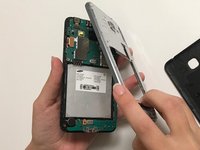
Separate the back casing from the phone by carefully using your fingers to pry it apart.
 Ask FixBot
-
-
-
Remove all 11 screws by using the J000 phillips head from the 64 Bit Driver Kit.
-
-
-
-
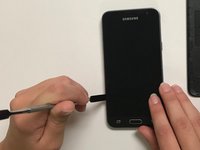
Use the flat side of the metal spudger to remove the middle frame bezel, and replace.
-
-


To reassemble your device, follow these instructions in reverse order.
Cancel: I did not complete this guide.
6 other people completed this guide.

Team

University of North Texas, Team S7-G2, Thomas Fall 2017 Member of University of North Texas, Team S7-G2, Thomas Fall 2017
UNT-THOMAS-F17S7G2
4 Members
48 Guides authored
