
Samsung Galaxy J3 Emerge Screen Replacement

PJ Yebisu and 4 other contributors
Last updated on Mar 6, 2019
Views: 3.8K
View statistics:
- Past 24 Hours:
- 4
- Past 7 Days:
- 17
- Past 30 Days:
- 73
- All Time:
- 3,777
Comments: 2
2 guide comments.
Go to guide commentsCompleted: 7 8
7 people have marked this guide "completed." Will you be next?
8 people have marked this guide "completed." Including you — great job!
Favorites: 2 3
2 people have favorited (and subscribed to) this guide. Will you be next?
3 people have favorited (and subscribed to) this guide — including you!
Introduction
Go to step 1 ↓Screen Replacement guide for a Samsung Galaxy J3 Emerge Model SM-J327P. To heat the adhesive up that holds the screen on the phone, use a hairdryer. The screen might need replacing if the display is unresponsive or if the phone won't turn on. The screen can be replaced if the original cracks.
What you need
Tools


-
-
-
Heat up the edges of the screen with a hair dryer.
-
Put the iFixit Opening Tool between the screen and body to open the edge of the screen up.
-
Work the iFixit Opening Tools around the whole screen to break the glue.
 Ask FixBot
-
-
-
-
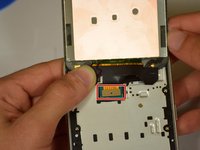
Pry the connector off of the motherboard by using a clean nail or the iFixit opening tool.
-
-


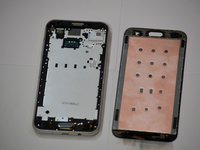
To reassemble your device, follow these instructions in reverse order.
Cancel: I did not complete this guide.
7 other people completed this guide.

Team

Cal Poly, Team S19-G2, White Winter 2019 Member of Cal Poly, Team S19-G2, White Winter 2019
CPSU-WHITE-W19S19G2
4 Members
60 Guides authored
2 Guide Comments
I was using my J3 Emerge last night and all of a sudden the screen just went blank. At first, I could press the power button and I would see the Samsung logo for a split second but now it doesn’t do that. You can tell it is trying to turn on because you can see it change from black to a blue like color. I thought it might be the battery so I took it to a store today to buy a new one but he said that wasn’t the problem. It is charging but I just can’t see anything. Do you think I need a new LCD screen or is it something else? Thank you!
