Free Shipping on Domestic Orders $75+

Samsung Galaxy J3 (2016) SIM Card Replacement

What you need

  1. Samsung Galaxy J3 (2016) SIM Card Replacement, Rear Cover: step 1, image 1 of 2 Samsung Galaxy J3 (2016) SIM Card Replacement, Rear Cover: step 1, image 2 of 2
    • Insert a fingernail or the flat end of a spudger into the divot to the left of the rear-facing camera.

    • Gently pry the rear cover away from the phone until all the plastic clips holding the cover are released.

    Ask FixBot

    Add Comment

  2. Samsung Galaxy J3 (2016) SIM Card Replacement: step 2, image 1 of 1
    • Remove the rear cover.

    • To reinstall the rear cover, align it to the back of the phone, and squeeze the perimeter of the phone to snap all the clips into place.

    Ask FixBot

    Add Comment

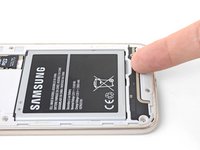
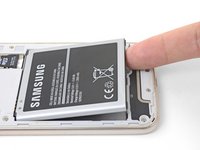
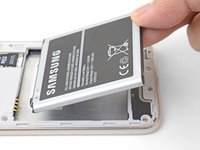
  3. Samsung Galaxy J3 (2016) SIM Card Replacement, Battery: step 3, image 1 of 3 Samsung Galaxy J3 (2016) SIM Card Replacement, Battery: step 3, image 2 of 3 Samsung Galaxy J3 (2016) SIM Card Replacement, Battery: step 3, image 3 of 3
    • Insert a fingernail or the flat end of a spudger into the divot below the battery pack.

    • Pry the battery pack out of its recess.

    • If you use the spudger, do not push too hard or you will puncture the battery pack.

    • Remove the battery pack.

    Ask FixBot

    Add Comment

  4. Samsung Galaxy J3 (2016) SIM Card Replacement, SIM Card: step 4, image 1 of 3 Samsung Galaxy J3 (2016) SIM Card Replacement, SIM Card: step 4, image 2 of 3 Samsung Galaxy J3 (2016) SIM Card Replacement, SIM Card: step 4, image 3 of 3
    • Use a fingertip to slide the MicroSD card out of its slot.

    • Remove the MicroSD card from the phone.

    • Repeat the procedure to remove the SIM card from its slot.

    • During reinstallation, make sure the MicroSD and SIM card are properly oriented. Each card will install in only one direction.

    Ask FixBot

    Add Comment

Conclusion

To reassemble your device, follow these instructions in reverse order.

Repair didn’t go as planned? Check out our Samsung Galaxy J3 (2016) Answers community for troubleshooting help.

Cancel: I did not complete this guide.

4 other people completed this guide.

Arthur Shi

Member since: 01/03/18

338,150 Reputation

851 Guides authored

Team

iFixit Member of iFixit

Staff

122 Members

26,593 Guides authored

0 Guide Comments

Add Comment

View Statistics:

Past 24 Hours: 2

Past 7 Days: 36

Past 30 Days: 137

All Time: 21,431