
Samsung Galaxy J3 (2016) Battery Replacement

Arthur Shi and one other contributor
Last updated on Feb 4, 2019
Views: 15K
View statistics:
- Past 24 Hours:
- 1
- Past 7 Days:
- 30
- Past 30 Days:
- 140
- All Time:
- 14,991
Comments: 2
1 comment on steps, 1 guide comment.
Go to guide commentsCompleted: 9 10
9 people have marked this guide "completed." Will you be next?
10 people have marked this guide "completed." Including you — great job!
Favorites: 0 1
No one has favorited (and subscribed to) this guide. Will you be the first?
1 person has favorited (and subscribed to) this guide — and that's you!
Introduction
Go to step 1 ↓Follow this guide to easily remove and replace the battery pack for your Samsung Galaxy J3.
Be sure to power off your phone before following this guide.
If your battery is swollen, take appropriate precautions.
For optimal performance, calibrate your newly installed battery: Charge it to 100% and keep charging it for at least 2 more hours. Then use your device until it shuts off due to low battery. Finally, charge it uninterrupted to 100%.
What you need


-
-
-
Insert a fingernail or the flat end of a spudger into the divot to the left of the rear-facing camera.
-
Gently pry the rear cover away from the phone until all the plastic clips holding the cover are released.
 Ask FixBot
-
-
-
-
-
-
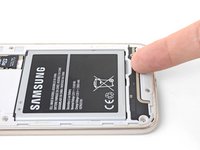
Insert a fingernail or the flat end of a spudger into the divot below the battery pack.
-
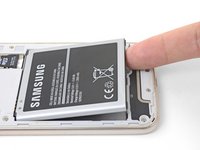
Pry the battery pack out of its recess.
-
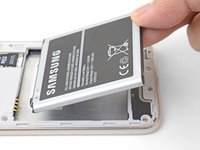
Remove the battery pack.
-
-


To reassemble your device, follow these instructions in reverse order.
Take your e-waste to an R2 or e-Stewards certified recycler.
Repair didn’t go as planned? Check out our Samsung Galaxy J3 (2016) Answers community for troubleshooting help.
Cancel: I did not complete this guide.
9 other people completed this guide.


1 Guide Comment
Hmm I can't seem to get the back cover off my phone. This phone is a POS, always has been. It's slow, hard to use, and for almost 300.00 bucks it lasted about 2 years. What a racket these phone companies have going.
