Free Shipping on Domestic Orders $75+

Samsung Galaxy Core Prime Home Button Replacement

What you need

    1. Samsung Galaxy Core Prime Home Button  Replacement, Battery: step 1, image 1 of 1
      • Turn the smartphone off by using the power button on the right-hand side.

      Ask FixBot

      Add Comment

    2. Samsung Galaxy Core Prime Home Button  Replacement: step 2, image 1 of 1
      • Turn the smartphone over so that the rear camera is face up.

      Ask FixBot

      Add Comment

    3. Samsung Galaxy Core Prime Home Button  Replacement: step 3, image 1 of 1
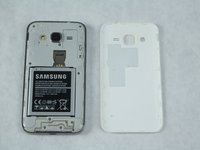
      • Use your fingernail or a flat tool to lift the back cover.

      Ask FixBot

      Add Comment

    4. Samsung Galaxy Core Prime Home Button  Replacement: step 4, image 1 of 2 Samsung Galaxy Core Prime Home Button  Replacement: step 4, image 2 of 2
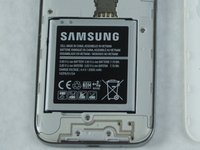
      • Locate the battery near the bottom of the phone. The battery is square, flat, and is labeled 'SAMSUNG'.

      Ask FixBot

      Add Comment

    5. Samsung Galaxy Core Prime Home Button  Replacement: step 5, image 1 of 1
      • Use your fingernail or a flat tool to lift the battery out.

      Ask FixBot

      Add Comment

    1. Samsung Galaxy Core Prime Home Button  Replacement, Home Button: step 6, image 1 of 1
      • Use your thumb to remove the sim card.

      Ask FixBot

      Add Comment

    2. Samsung Galaxy Core Prime Home Button  Replacement: step 7, image 1 of 2 Samsung Galaxy Core Prime Home Button  Replacement: step 7, image 2 of 2
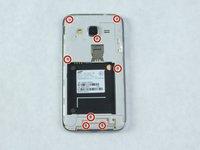
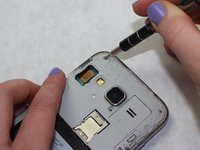
      • Use a Phillips #00 screwdriver to remove the eight 4 mm screws that secure the midframe.

      Ask FixBot

      Add Comment

    3. Samsung Galaxy Core Prime Home Button  Replacement: step 8, image 1 of 1
      • Heat the frame with a hair dryer or heat gun. Do this until the adhesive is loosened.

      • Take care when using these heating tools.

      Ask FixBot

      Add Comment

    4. Samsung Galaxy Core Prime Home Button  Replacement: step 9, image 1 of 1
      Tool used on this step:
      iFixit Opening Tool
      $1.99
      Buy
      Ask FixBot

      Add Comment

    5. Samsung Galaxy Core Prime Home Button  Replacement: step 10, image 1 of 2 Samsung Galaxy Core Prime Home Button  Replacement: step 10, image 2 of 2
      Tool used on this step:
      Tweezers
      $4.99
      Buy
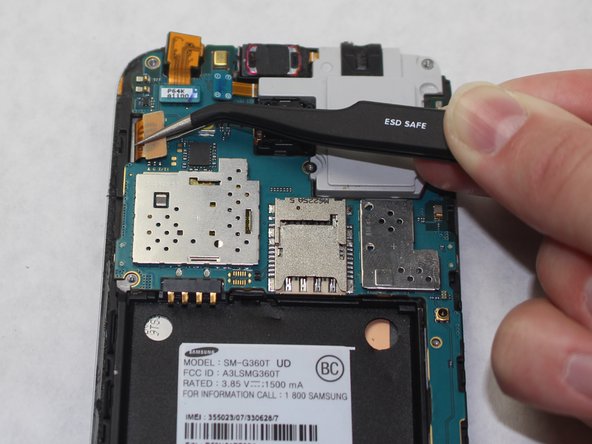
      • Disconnect the LCD screen/touch screen ribbon from the motherboard using tweezers.

      Ask FixBot

      Add Comment

    6. Samsung Galaxy Core Prime Home Button  Replacement: step 11, image 1 of 1
      Tool used on this step:
      iFixit Opening Tool
      $1.99
      Buy
      Ask FixBot

      Add Comment

    7. Samsung Galaxy Core Prime Home Button  Replacement: step 12, image 1 of 1
      • Heat the sides of the screen with a heat gun or hair dryer.

      Ask FixBot

      Add Comment

    8. Samsung Galaxy Core Prime Home Button  Replacement: step 13, image 1 of 1
      Tool used on this step:
      iFixit Opening Tool
      $1.99
      Buy
      • Use the iFixit Opening Tool to remove the plastic panel that separates the motherboard and the screen.

      Ask FixBot

      Add Comment

    9. Samsung Galaxy Core Prime Home Button  Replacement: step 14, image 1 of 1
      • Use tweezers to remove the home button.

      Ask FixBot

      Add Comment

Conclusion

To reassemble your device, follow these instructions in reverse order.

Cancel: I did not complete this guide.

One other person completed this guide.

Kate Vogel

Member since: 10/02/18

187 Reputation

1 Guide authored

0 Guide Comments

Add Comment

View Statistics:

Past 24 Hours: 2

Past 7 Days: 6

Past 30 Days: 28

All Time: 1,938