This translation was generated by a machine and has not been reviewed by a person yet. Speak this language? Review it.
Introduction
This tutorial will show how to replace the back cover of your Galaxy A8.
Opening the phone will damage the waterproof seals. If you do not replace the adhesive gaskets, your phone will work normally, but will no longer be waterproof.
You will likely need replacement adhesive to reattach the back cover.
-
-
-
Turn off your phone.
-
Prepare an iOpener or hair dryer to soften the adhesive on the back of the A8.
-
The adhesive is distributed over the outline of the back cover shown in red in the photo.
 Ask FixBot
-
-
-
Use a suction cup to lift the back cover and insert an opening pick into the slot created.
-
Start in the middle and cut the adhesive while maintaining tension on the suction cup.
-
-
-
-
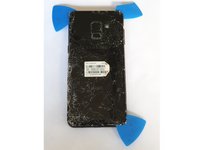
As you go, take additional opening picks and carefully move them from corner to corner until all 4 corners are freed.
-
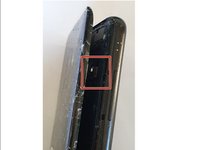
Be careful not to damage the fingerprint reader connector when opening the back cover. Disconnect it following the instructions in the next step.
-
-




To reassemble your device, follow the instructions in reverse order.
Cancel: I did not complete this guide.
11 other people completed this guide.
Special thanks to these translators:
100%

Jerry Wheeler is helping us fix the world! Want to contribute?
Start translating ›


