Introduction
Use this guide to replace a damaged back cover on your Samsung Galaxy A32 5G.
You’ll need replacement adhesive to reattach components when reassembling the device.
What you need
-
-
-
Prepare an iOpener and apply it to the back cover for at least two minutes to loosen the adhesive underneath.
 Ask FixBot
-
-
-
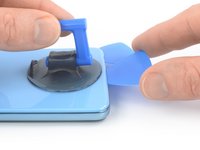
Secure a suction handle to the bottom edge of the back cover, as close to the edge as possible.
-
Lift the back cover with the suction handle to create a small gap between the back cover and the frame.
-
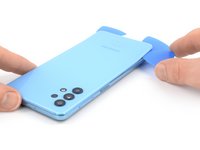
Insert an opening pick into the gap you created.
-
Slide the opening pick to the bottom right corner to slice the adhesive.
-
Leave the opening pick in place to prevent the adhesive from resealing.
-
-
-
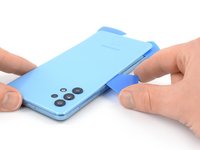
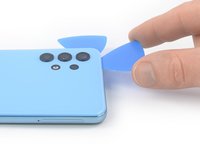
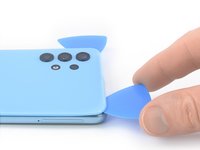
Insert a second opening pick at the bottom edge of your phone.
-
Slide the opening pick to the bottom left corner to slice the adhesive.
-
Leave the opening picks in place to prevent the adhesive from resealing.
-
-
-
-
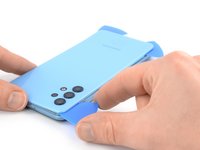
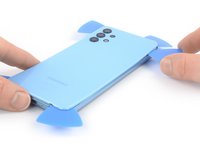
Insert a third opening pick at the bottom left corner of your phone.
-
Slide the opening pick along the left edge of your phone to slice the adhesive.
-
Leave the opening pick in the top left corner to prevent the adhesive from resealing.
-
-
-
Insert a fourth opening pick underneath the top left corner of your phone.
-
Slide the opening pick along the top edge to slice the adhesive.
-
Leave the opening pick in the top right corner to prevent the adhesive from resealing.
-
-
-
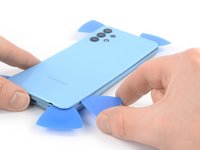
Insert a fifth opening pick underneath the top right corner.
-
Slide the opening pick along the right edge of the back cover to slice the remaining adhesive.
-
-











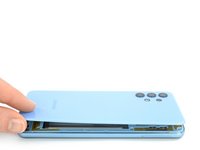
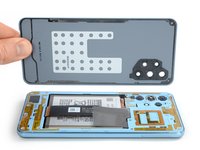
To reassemble your device, follow these instructions in reverse order.
Take your e-waste to an R2 or e-Stewards certified recycler.
Repair didn’t go as planned? Try some basic troubleshooting, or ask our Answers community for help.
Cancel: I did not complete this guide.
19 other people completed this guide.


5 Guide Comments
What? Where is the rest of this Manual? There's more to a screen replacement then taking the old screen off? There is also components that still need to be swapped over like the Mother board, the Charge Port, the Cameras etc....
I have a question What would cause my bluetooth and my wifi to start randomly stop working after an update from samsung and now i cant goto a further update? or a before update?
Absolutely useless, just the first step of 20
Just useless, first step of over 20 steps
