Free Shipping on Domestic Orders $75+

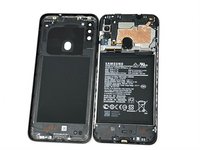
Samsung Galaxy A11 Back Cover Replacement

What you need

  1. Samsung Galaxy A11 Back Cover Replacement, Back Cover: step 1, image 1 of 3 Samsung Galaxy A11 Back Cover Replacement, Back Cover: step 1, image 2 of 3 Samsung Galaxy A11 Back Cover Replacement, Back Cover: step 1, image 3 of 3
    • Place the SIM eject tool in the hole of the sim tray.

    • Push until part of the SIM tray is pushed out.

    • Pull out the rest of the SIM tray.

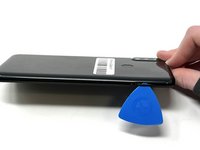
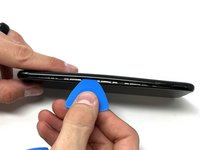
  2. Samsung Galaxy A11 Back Cover Replacement: step 2, image 1 of 3 Samsung Galaxy A11 Back Cover Replacement: step 2, image 2 of 3 Samsung Galaxy A11 Back Cover Replacement: step 2, image 3 of 3
    • Gently pry open the area of the back cover near the SIM tray using an iFixit opening pick.

    • Gently move the pick along the gap and pry open the clips holding it together.

    • If possible, use multiple picks to prevent the back cover from closing.

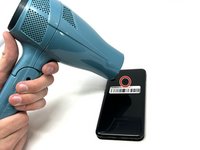
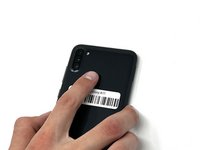
  3. Samsung Galaxy A11 Back Cover Replacement: step 3, image 1 of 3 Samsung Galaxy A11 Back Cover Replacement: step 3, image 2 of 3 Samsung Galaxy A11 Back Cover Replacement: step 3, image 3 of 3
    • Using a hair dryer on low heat, heat the fingerprint sensor in increments of 30 seconds to loosen the surrounding adhesive.

    • Gently push the fingerprint sensor until it detaches from the back cover.

    • If needed, remove the button by prying it from the bottom of the device.

Conclusion

To reassemble your device, follow these instructions in reverse order.

4 other people completed this guide.

Kristen Gismondi

Member since: 11/12/14

104,716 Reputation

266 Guides authored

Team

iFixit Member of iFixit

Staff

124 Members

24,909 Guides authored

0 Guide Comments

Add Comment

View Statistics:

Past 24 Hours: 2

Past 7 Days: 17

Past 30 Days: 98

All Time: 1,171