
Samsung Eternity Motherboard Replacement

Kevin Huang and 8 other contributors
Last updated on Jan 13, 2025
Views: 2.7K
View statistics:
- Past 24 Hours:
- 3
- Past 7 Days:
- 9
- Past 30 Days:
- 38
- All Time:
- 2,701
Comments: 0
No one has left comments on this guide. Will you be first?
Go to guide commentsCompleted: 0 1
No one has marked this guide "completed." Will you be the first?
1 person has marked this guide "completed." It's you — great job!
Favorites: 1 2
1 person has favorited (and subscribed to) this guide. Will you be next?
2 people have favorited (and subscribed to) this guide — including you!
Incorrect Tools
Help make this guide better by using the correct tools in images and/or text.
Needs More Images
A few more images would make this guide's procedures crystal clear.
Better Introduction
Improve this guide by completing or revising its introduction.
Introduction
Go to step 1 ↓You will need to find a clean area to work in and have the necessary tools. Follow this guide to gain access to your cellphone's motherboard.
What you need
Tools
-
Spudger4.9
-


-
-
-
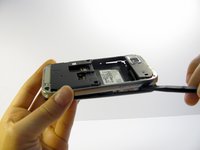
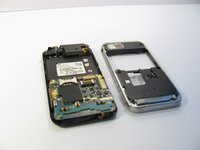
Use a nylon spudger to gently pry the silver plastic back plate from the body of the phone.
-
-
-
-
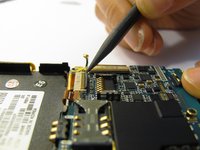
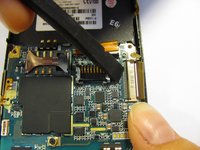
Pop the two black hinged-release levers toward their ribbons, then slide the ribbons out.
-
-
-
-
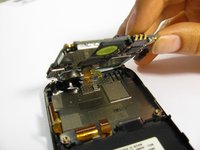
Slightly pull up one side of the motherboard.
-
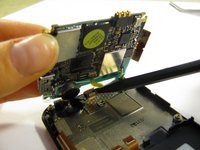
Pull the button/microphone plug out of its socket.
-
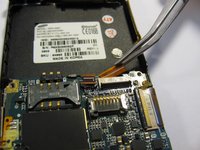
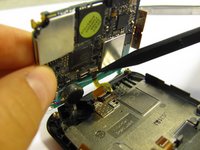
Pop the red hinged-release lever away from its ribbon, then slide the ribbon out.
-
 Ask FixBot







To reassemble your device, follow these instructions in reverse order.

Team

Cal Poly, Team 15-11, Regan Spring 2011 Member of Cal Poly, Team 15-11, Regan Spring 2011
CPSU-REGAN-S11S15G11
5 Members
84 Guides authored
