
Samsung Eternity Back Case Replacement

Michelle Haddock and 8 other contributors
Last updated on Jan 13, 2025
Views: 2.1K
View statistics:
- Past 24 Hours:
- 2
- Past 7 Days:
- 16
- Past 30 Days:
- 81
- All Time:
- 2,121
Comments: 0
No one has left comments on this guide. Will you be first?
Go to guide commentsCompleted: 0 1
No one has marked this guide "completed." Will you be the first?
1 person has marked this guide "completed." It's you — great job!
Favorites: 0 1
No one has favorited (and subscribed to) this guide. Will you be the first?
1 person has favorited (and subscribed to) this guide — and that's you!
Incorrect Tools
Help make this guide better by using the correct tools in images and/or text.
Introduction
Go to step 1 ↓You will need a clean area to work in with a wide, flat surface. You will also need the necessary tools to complete this repair. This goal of this guide is to replace the back case of your Samsung Eternity. No special skills are required, just access to the necessary tools and a space to work in.
What you need
Tools
-
Spudger4.9


-
-
-
-
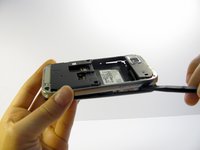
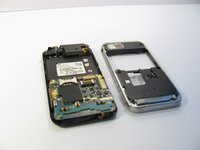
Use a nylon spudger to gently pry the silver plastic back plate from the body of the phone.
-
 Ask FixBot


To reassemble your device, follow these instructions in reverse order.

Team

Cal Poly, Team 15-11, Regan Spring 2011 Member of Cal Poly, Team 15-11, Regan Spring 2011
CPSU-REGAN-S11S15G11
5 Members
84 Guides authored
