Free Shipping on Domestic Orders $75+

Samsung Epic 4G Touch microSD Card Replacement

What you need

  1. Samsung Epic 4G Touch microSD Card Replacement, Rear Case: step 1, image 1 of 2 Samsung Epic 4G Touch microSD Card Replacement, Rear Case: step 1, image 2 of 2
    • Insert a plastic opening tool, or your fingernail, into the opening near the left side of the headphone jack.

    • Pry the opening tool downward to pop the rear case from its clips securing it to the the midframe.

    Ask FixBot

    Add Comment

  2. Samsung Epic 4G Touch microSD Card Replacement: step 2, image 1 of 2 Samsung Epic 4G Touch microSD Card Replacement: step 2, image 2 of 2
    • Lift and remove the rear case.

    Ask FixBot

    Add Comment

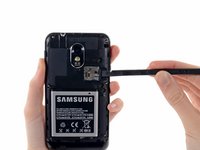
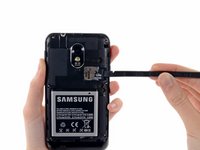
  3. Samsung Epic 4G Touch microSD Card Replacement, microSD Card: step 3, image 1 of 2 Samsung Epic 4G Touch microSD Card Replacement, microSD Card: step 3, image 2 of 2
    • Use the flat end of a spudger, or your fingernail, to press the microSD card slightly deeper into its slot until you hear a click.

    • After the click, release the card and it will pop out of its slot.

    • During reassembly, push the microSD card into the slot until it clicks in place.

    Ask FixBot

    Add Comment

  4. Samsung Epic 4G Touch microSD Card Replacement: step 4, image 1 of 1
    • Pull the microSD card away from its slot.

    Ask FixBot

    Add Comment

Conclusion

To reassemble your device, follow these instructions in reverse order.

Cancel: I did not complete this guide.

3 other people completed this guide.

2 Guide Comments

Uhh.... my Australian SGSII looks different to this...

Bonj - Reply Share

If you are having trouble addint a 64gb micro sd card, it's because you have to first format that card to FAT32. You have to do that to the memory card through a computer. Youtube too, it'll help

asff - Reply Share

Add Comment

View Statistics:

Past 24 Hours: 4

Past 7 Days: 13

Past 30 Days: 45

All Time: 4,802