
Samsung DV180F Repair Battery Replacement

maria and 2 other contributors
Last updated on Dec 14, 2016
Views: 1.1K
View statistics:
- Past 24 Hours:
- 3
- Past 7 Days:
- 24
- Past 30 Days:
- 90
- All Time:
- 1,127
Comments: 0
No one has left comments on this guide. Will you be first?
Go to guide commentsCompleted: 0 1
No one has marked this guide "completed." Will you be the first?
1 person has marked this guide "completed." It's you — great job!
Favorites: 1 2
1 person has favorited (and subscribed to) this guide. Will you be next?
2 people have favorited (and subscribed to) this guide — including you!
Introduction
Go to step 1 ↓Batteries are often replaced in this device because of excessive usage since it is its most important part. Here is step by step how to replace the battery of the Samsung DV180F.
What you need
Tools

-
-
-
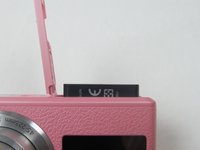
Locate the battery door and slide it to the right to unlatch it. Swing the battery door up to expose the battery chamber.
 Ask FixBot
-
-
-
Locate the blue latch that holds the battery in the battery chamber. Using your fingernail or a plastic opening tool, push it away from the battery, in the direction of the arrow on the latch.
-
-
-
-
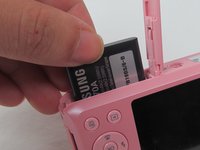
Once the latch is disengaged, the battery should pop up. Grab the battery and slide it up and out of the camera.
-
-
-
Move the blue latch out of the way and slide the replacement battery into the battery chamber. Lightly push until the battery clicks in place. Close the battery door.
-
-



To reassemble your device, follow these instructions in reverse order.

Team

USF Tampa, Team 14-4, Eyestone Fall 2016 Member of USF Tampa, Team 14-4, Eyestone Fall 2016
USFT-EYESTONE-F16S14G4
4 Members
48 Guides authored
