Free Shipping on Domestic Orders $75+

Samsung Chromebook 3 Daughterboard Replacement

Views: 2K

View statistics:

Past 24 Hours:
2
Past 7 Days:
12
Past 30 Days:
72
All Time:
2,011
Comments: 0

No one has left comments on this guide. Will you be first?

Go to guide comments
Completed: 3

3 people have marked this guide "completed." Will you be next?

Favorites: 0

No one has favorited (and subscribed to) this guide. Will you be the first?

Time Required: 40 - 50 minutes
Difficulty: Moderate
Samsung Chromebook 3 Daughterboard Replacement

Introduction

Go to step 1 ↓

This guide will show you how to replace the daughterboard in a Samsung Chromebook 3. The right side USB and headphone jack are soldered to the board, requiring a full daughterboard replacement to fix a malfunctioning port.

What you need

Parts

Tools

    1. Samsung Chromebook 3 Daughterboard Replacement, Bottom Case: step 1, image 1 of 2 Samsung Chromebook 3 Daughterboard Replacement, Bottom Case: step 1, image 2 of 2
      • Place the Chromebook face down so that the bottom case is exposed.

      • Using a Phillips #00 screwdriver, remove nine 4.6mm screws from the back casing.

      Ask FixBot

      Add Comment

    2. Samsung Chromebook 3 Daughterboard Replacement: step 2, image 1 of 3 Samsung Chromebook 3 Daughterboard Replacement: step 2, image 2 of 3 Samsung Chromebook 3 Daughterboard Replacement: step 2, image 3 of 3
      • Use a iFixit opening tool to gently pry the case up from the vent on the hinge side of the Chromebook.

      • You should hear a popping sound as the connectors disengage inside the case.

      Ask FixBot

      Add Comment

    3. Samsung Chromebook 3 Daughterboard Replacement: step 3, image 1 of 1
      • Lift the case up and off the device

      Ask FixBot

      Add Comment

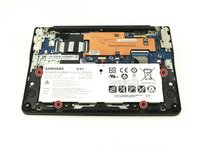
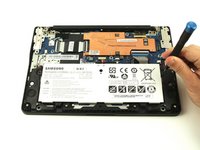
    1. Samsung Chromebook 3 Daughterboard Replacement, Battery: step 4, image 1 of 2 Samsung Chromebook 3 Daughterboard Replacement, Battery: step 4, image 2 of 2
      • Locate the battery and remove the four 4.6mm screws at the corners which attach it to case using a Phillips #00 screwdriver.

      Ask FixBot

      Add Comment

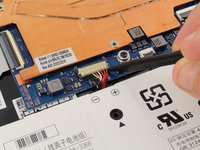
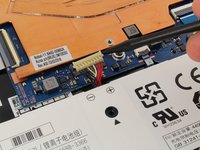
    2. Samsung Chromebook 3 Daughterboard Replacement: step 5, image 1 of 2 Samsung Chromebook 3 Daughterboard Replacement: step 5, image 2 of 2
      • Use a spudger to gently pry the power cable cord upwards from the motherboard.

      Ask FixBot

      Add Comment

    3. Samsung Chromebook 3 Daughterboard Replacement: step 6, image 1 of 1
      • Lift the battery up and out from the case.

      Ask FixBot

      Add Comment

    1. Samsung Chromebook 3 Daughterboard Replacement, Daughterboard: step 7, image 1 of 2 Samsung Chromebook 3 Daughterboard Replacement, Daughterboard: step 7, image 2 of 2
      • Before you begin the process of removing the daughterboard, you will need to remove the port case. Using a Phillips #00 screwdriver, remove the three 4.6mm screws.

      Ask FixBot

      Add Comment

    2. Samsung Chromebook 3 Daughterboard Replacement: step 8, image 1 of 2 Samsung Chromebook 3 Daughterboard Replacement: step 8, image 2 of 2
      • Use a spudger to unhook the cable connecter from the speaker cable.

      Ask FixBot

      Add Comment

    3. Samsung Chromebook 3 Daughterboard Replacement: step 9, image 1 of 3 Samsung Chromebook 3 Daughterboard Replacement: step 9, image 2 of 3 Samsung Chromebook 3 Daughterboard Replacement: step 9, image 3 of 3
      • Pry the small coaxial cables upwards from the connecters on the wireless chip.

      Ask FixBot

      Add Comment

    4. Samsung Chromebook 3 Daughterboard Replacement: step 10, image 1 of 2 Samsung Chromebook 3 Daughterboard Replacement: step 10, image 2 of 2
      • Using the Phillips #00, unscrew one 4.6mm screw from the daughterboard.

      Ask FixBot

      Add Comment

    5. Samsung Chromebook 3 Daughterboard Replacement: step 11, image 1 of 3 Samsung Chromebook 3 Daughterboard Replacement: step 11, image 2 of 3 Samsung Chromebook 3 Daughterboard Replacement: step 11, image 3 of 3
      • Use a spudger to lift the gray plastic bar on the zif connecter up, then use your fingers to remove the cable ribbon.

      Ask FixBot

      Add Comment

    6. Samsung Chromebook 3 Daughterboard Replacement: step 12, image 1 of 1
      • Loosen the daughterboard from the USB port with a spudger as there is some adhesive underneath, and you're ready to remove the daughterboard.

      Ask FixBot

      Add Comment

Conclusion

To reassemble your device, follow these instructions in reverse order.

Cancel: I did not complete this guide.

3 other people completed this guide.

Sarah Westberg

Member since: 03/11/19

43,295 Reputation

72 Guides authored

0 Guide Comments

Add Comment

View Statistics:

Past 24 Hours: 2

Past 7 Days: 12

Past 30 Days: 72

All Time: 2,011