
Samsung Blast Motherboard Replacement

Paige Weinstein and 16 other contributors
Last updated on May 7, 2024
Views: 677
View statistics:
- Past 24 Hours:
- 0
- Past 7 Days:
- 3
- Past 30 Days:
- 26
- All Time:
- 677
Comments: 0
No one has left comments on this guide. Will you be first?
Go to guide commentsCompleted: 1 2
1 person has marked this guide "completed." Will you be next?
2 people have marked this guide "completed." Including you — great job!
Favorites: 0 1
No one has favorited (and subscribed to) this guide. Will you be the first?
1 person has favorited (and subscribed to) this guide — and that's you!
Needs Better Images
Better photos will improve this guide. Help out by taking, editing, or uploading new ones!
Slice and Dice
The steps in this guide should be split up and made into a series of prerequisite guides.
Better Introduction
Improve this guide by completing or revising its introduction.
Introduction
Go to step 1 ↓Use this guide to replace the motherboard of a Samsung Blast. This guide will take you through the process of how to successfully remove and replace the motherboard. A motherboard may need replacement if the device stops working.
What you need
Tools


-
-
-
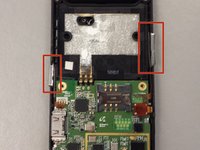
With a Phillips #00 screwdriver, remove the six screws that secure the back of the case.
-
-
-
-
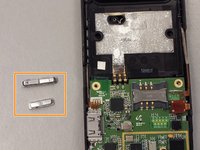
Use the small plastic opening tool to gently remove the motherboard from the rest of the phone.
-
-
Tool used on this step:Tweezers$4.99
-
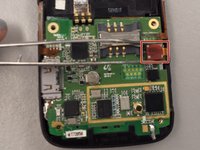
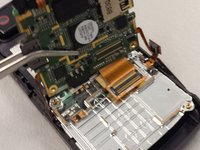
Gently grab the motherboard with tweezers, then disconnect it from the two attached plates.
-


 Ask FixBot




To reassemble your device, follow these instructions in reverse order.
Cancel: I did not complete this guide.
One other person completed this guide.

Team

Ohio State, Team 1-5, Buehl Spring 2014 Member of Ohio State, Team 1-5, Buehl Spring 2014
OSU-BUEHL-S14S1G5
4 Members
24 Guides authored
