Introduction
The disc drive in the Samsung BD-JM57C Blu ray player is used to read CDs and DVDs placed into the player. A common problem with disc drives is the build-up of dust; before you attempt to remove the disc drive, try cleaning it first.
If you have done this as well as troubleshot your device and it still will not eject the disc tray or play the DVD, utilize this guide to remove and replace a faulty disc drive. Handle ribbons with care, especially while pulling the disc drive out.
Make sure the device is not plugged in before working on it.
What you need
-
-
-
Use the Phillips #00 Screwdriver to remove the single 9.6mm screw holding the top cover in place.
-
Remove the cover by sliding it up and then out.
 Ask FixBot
-
-
-
-
-
-
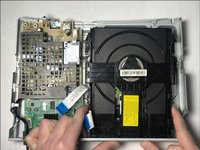
Disconnect the two ribbons that connect the disc drive to the motherboard.
-
-
-
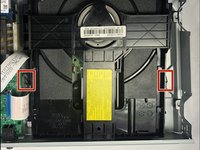
Push in on the two metal tabs on the side of the disc drive.
-
Push forward to slide the disc drive out of the casing.
-
-


To reassemble your device, follow these instructions in reverse order.
Cancel: I did not complete this guide.
One other person completed this guide.

Team

Embry-Riddle Aeronautical University, Team S1-G5, Cromer Twal Spring 2020 Member of Embry-Riddle Aeronautical University, Team S1-G5, Cromer Twal Spring 2020
ERAU-CROMER TWAL-S20S1G5
4 Members
60 Guides authored
