
Samsung ATIV Smart PC 500T Battery Replacement

Crystal Dinh and 3 other contributors
Last updated on Nov 23, 2015
Views: 20K
View statistics:
- Past 24 Hours:
- 7
- Past 7 Days:
- 45
- Past 30 Days:
- 143
- All Time:
- 20,463
Comments: 6
1 comment on steps, 5 guide comments.
Go to guide commentsCompleted: 13 14
13 people have marked this guide "completed." Will you be next?
14 people have marked this guide "completed." Including you — great job!
Favorites: 3 4
3 people have favorited (and subscribed to) this guide. Will you be next?
4 people have favorited (and subscribed to) this guide — including you!
Featured Student Guide
This guide has been the hard work of our awesome students and is found to be exceptionally cool by the iFixit staff.
Introduction
Go to step 1 ↓You will be removing the battery from your device. If you haven't done so already, make sure the tablet is completely powered off before continuing.
What you need
Tools


-
-
-
Remove the stylus from the device.
-
Place the device screen-up on a hard surface, like a table.
 Ask FixBot
-
-
-
Insert a plastic pry tool or opening pick between the glass and plastic case.
-
Work your way around the plastic edge, unclipping the backplate.
-
Once the clips are loosened, remove the backplate. Some force may be necessary.
-
-
-
-
-
-
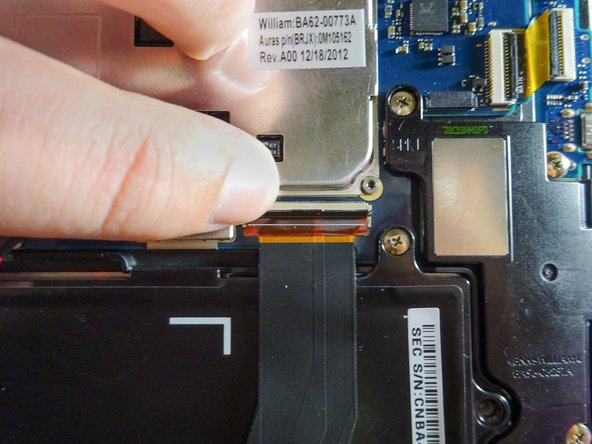
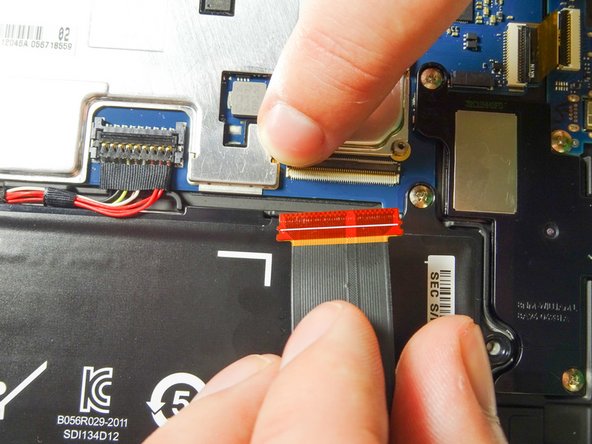
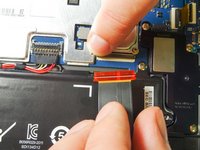
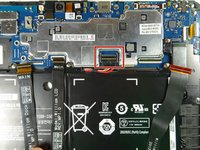
Disconnect the three ribbon cables from the motherboard to free the battery.
-
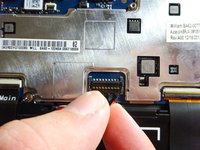
Use your finger to lift the flap securing each ZIF connector.
-
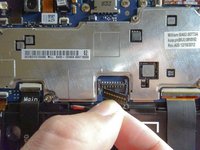
Slide the ribbon cable out and towards you. Now it should be completely detached.
-
Repeat with the other two cables.
-
-
-
Get a firm hold of the power cable as close to the clip as you can.
-
Pull the power cable up and out of the clip.
-
-
-
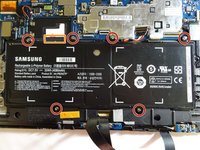
Remove the six 3.5-mm screws using the Phillips #00 screwdriver.
-
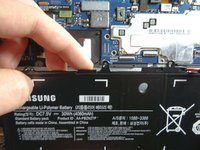
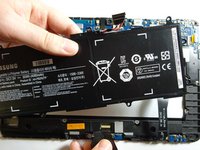
Lift the battery out by hooking your finger under the tab on the top side of the battery and pulling it up and towards you. The battery should come out easily.
-
-






To reassemble your device, follow these instructions in reverse order.
Cancel: I did not complete this guide.
13 other people completed this guide.

Team

Baylor, Team 6-6, Williams Fall 2015 Member of Baylor, Team 6-6, Williams Fall 2015
BU-WILLIAMS-F15S6G6
3 Members
60 Guides authored
5 Guide Comments
Do you have a battery for the Samsung ATIV Smart PC 700T1C?
If you're lucky, you'll replace the battery & off you go.
Unfortunately, a whole LOT of folks do this, to no avail.
If you pop for the new battery, keep the packing as new as you can in case it's NOT the issue-- at least you might recoup some of the money on Ebay.
After that, also sell your tablet on Ebay for parts because, with some units, you can change out parts all day long & it'll just never run again. Better to count your losses & do some homework this time to hopefully buy a more dependable product.
This series is just shocking at how many people have dead tablets in TWO years!
Shame on Samsung, for not recalling them. I guess they're big enough not to care....
I got my ativ500t last 2014. After a year, the dock is not working anymore. I went to the service center and paid because it's beyond warranty, but they could not solve the problem. They told me the motherboard was broken. After a yr?! Motherboard broken?! Since I cannot do anything about it, I just ditched the dock and used it as a tab, but less frequently. Now, after barely 3 yrs, it will not turn on. Nothing happened to it. It did not get wet or fell. It just fell dead suddenly. I cannot bear to say this, but I was wrong when I purchased this product. I did not get the value I paid for. It is on the pricey tablet pcs, but it did not even last for 3 full yrs considering I do not even use it that much because I have a PC and smartphone. I am very disappointed with samsung and its service center. Shame.
