
SR405QM Battery Replacement

Chris Pittner and 6 other contributors
Last updated on Dec 16, 2022
Views: 1.6K
View statistics:
- Past 24 Hours:
- 3
- Past 7 Days:
- 19
- Past 30 Days:
- 91
- All Time:
- 1,646
Comments: 0
No one has left comments on this guide. Will you be first?
Go to guide commentsCompleted: 2 3
2 people have marked this guide "completed." Will you be next?
3 people have marked this guide "completed." Including you — great job!
Favorites: 0 1
No one has favorited (and subscribed to) this guide. Will you be the first?
1 person has favorited (and subscribed to) this guide — and that's you!
Needs Better Images
Better photos will improve this guide. Help out by taking, editing, or uploading new ones!
Introduction
Go to step 1 ↓Follow this guide to remove a dead battery and replace it with a new one.
What you need
Tools

-
-
-
Gently place the instrument upside-down on a soft surface.
-
Locate the battery cavity cap and screws.
 Ask FixBot
-
-
-
Use a Phillips #2 head screwdriver to unscrew both screws. Two #1 1mm long screws.
-
-
-
-
Gently lift the battery from the cavity.
-
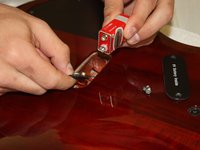
Detach the battery completely by firmly pulling the fabric connector from the conducting end of the battery.
-
-








To reassemble your device, follow these instructions in reverse order with a fresh battery.
Cancel: I did not complete this guide.
2 other people completed this guide.

Team

Cal Poly, Team 5-18, Forte Winter 2013 Member of Cal Poly, Team 5-18, Forte Winter 2013
CPSU-FORTE-W13S5G18
4 Members
96 Guides authored
