This translation was generated by a machine and has not been reviewed by a person yet. Speak this language? Review it.

SNK Neo-Geo X Battery Replacement

Gloubi and one other contributor
Last updated on Sep 2, 2026
Views: 716
View statistics:
- Past 24 Hours:
- 6
- Past 7 Days:
- 26
- Past 30 Days:
- 123
- All Time:
- 716
Comments: 1
1 guide comment.
Go to guide commentsCompleted: 1 2
1 person has marked this guide "completed." Will you be next?
2 people have marked this guide "completed." Including you — great job!
Favorites: 1 2
1 person has favorited (and subscribed to) this guide. Will you be next?
2 people have favorited (and subscribed to) this guide — including you!
Featured Guide
This guide has been found to be exceptionally cool by the iFixit staff.
Community-Contributed Guide
An awesome member of our community made this guide. It was not created by iFixit staff.
Introduction
Go to step 1 ↓The Neo-Geo X is a retro game console, released in 2012, that pays tribute to the legendary 1990s Neo-Geo. It combines the classic spirit of the original console with modern features, allowing you to play over 20 iconic titles from the Neo-Geo era, such as Metal Slug, King of Fighters, or Samurai Shodown.
Compact and portable, the Neo-Geo X can connect to a TV via HDMI for a living room experience, while also offering a portable station with an integrated screen and included controllers. Its design reflects the retro aesthetic of the original console, which will delight fans of nostalgia. It is an ideal console for retro-gaming fans wishing to relive arcade classics in a modern and accessible format.
What you need
Parts
Tools


-
-
-
Remove the 8 screws: 3 on each long side and 1 on each short side.
-
-
-
Gently slide an opening pick along the edge, then carefully lift the rear case.
-
Optional: if the rear case is sticky due to plastic degradation, clean it with WD-40.
-
-
-
-
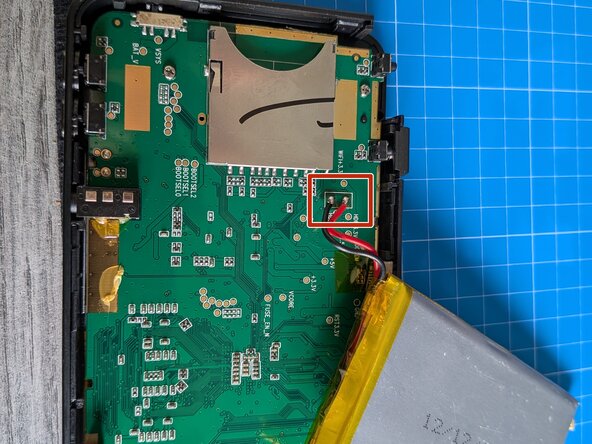
Peel up the battery.
-
Desolder the two wires.
-
Battery model: AHB355585 (voltage: 3.7 V; technology: Li-polymer; color: black; capacity: 2800 mAh; net weight: 47 g; weight: 97 g; power: 10.36 Wh).
-


 Ask FixBot




To reassemble your device, follow the instructions in reverse order.
Cancel: I did not complete this guide.
One other person completed this guide.

