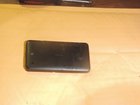
SIM Card Slot Repair

Cyndal Burns and 2 other contributors
Last updated on Aug 8, 2023
Views: 16K
View statistics:
- Past 24 Hours:
- 7
- Past 7 Days:
- 48
- Past 30 Days:
- 227
- All Time:
- 16,139
Comments: 3
2 comments on steps, 1 guide comment.
Go to guide commentsCompleted: 3 4
3 people have marked this guide "completed." Will you be next?
4 people have marked this guide "completed." Including you — great job!
Favorites: 0 1
No one has favorited (and subscribed to) this guide. Will you be the first?
1 person has favorited (and subscribed to) this guide — and that's you!
Introduction
Go to step 1 ↓Very often, people must buy a completely new phone when something small like the soldering on the SIM slot breaks.
This guide provides brief instructions on how to fix a faulty or broken connection on a SIM card reader.
What you need
Tools


-
-
-
Start by getting your work space set up and clear of clutter.
-
Remove the back of the phone.
-
Remove the battery and set it aside.
 Ask FixBot
-
-
-
Remove the six 2.3mm screws with a "T5" Screwdriver.
-
Remove the 2 additional 2.3mm screws from the side opposite the volume and power button.
-
-
-
-
Inspect the sim slot to find where the factory solder might be broken.
-
Once found dip the soldering gun in the flux to prevent the solder sticking to the gun.
-
Use the 60/40 lead solder to repair the damaged spot on the sim slot.
-
-


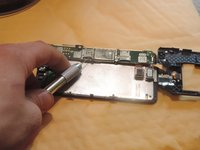
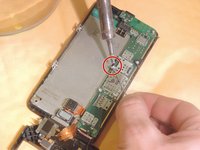
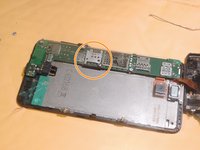
To reassemble your device, follow these instructions in reverse order.
Cancel: I did not complete this guide.
3 other people completed this guide.

Team

Arkansas State University, Team S1-G2, Chamberlain Summer 2017 Member of Arkansas State University, Team S1-G2, Chamberlain Summer 2017
ARSU-CHAMBERLAIN-SU17S1G2
1 Member
12 Guides authored
