Free Shipping on Domestic Orders $75+

SAFFUN Wireless N64 Controller Rumble Motor Replacement

What you need

  1. SAFFUN Wireless N64 Controller Rumble Motor Replacement, Back Plate: step 1, image 1 of 1
    • Before you begin, make sure the controller is disconnected and the LED indicator light is off.

  2. SAFFUN Wireless N64 Controller Rumble Motor Replacement: step 2, image 1 of 2 SAFFUN Wireless N64 Controller Rumble Motor Replacement: step 2, image 2 of 2
    • Use a Phillips #1 screwdriver to remove the seven 9.3 mm screws from the backplate.

  3. SAFFUN Wireless N64 Controller Rumble Motor Replacement: step 3, image 1 of 2 SAFFUN Wireless N64 Controller Rumble Motor Replacement: step 3, image 2 of 2
    • Use a Phillips #1 screwdriver to remove the two 9.3 mm screws.

    • Use a screwdriver with a shaft length of at least 60 mm to reach the deep-set screws.

  4. SAFFUN Wireless N64 Controller Rumble Motor Replacement: step 4, image 1 of 3 SAFFUN Wireless N64 Controller Rumble Motor Replacement: step 4, image 2 of 3 SAFFUN Wireless N64 Controller Rumble Motor Replacement: step 4, image 3 of 3
    • Slide an opening pick along the edge of the rear cover to release the clips.

    • Gently remove the back plate from the controller.

  5. SAFFUN Wireless N64 Controller Rumble Motor Replacement, Battery: step 5, image 1 of 2 SAFFUN Wireless N64 Controller Rumble Motor Replacement, Battery: step 5, image 2 of 2
    • Carefully remove the battery from the holder.

    • Don't rip out the wires. The battery is still attached to the controller.

  6. SAFFUN Wireless N64 Controller Rumble Motor Replacement: step 6, image 1 of 2 SAFFUN Wireless N64 Controller Rumble Motor Replacement: step 6, image 2 of 2
    • Remove the rumble motor and its holder.

  7. SAFFUN Wireless N64 Controller Rumble Motor Replacement: step 7, image 1 of 1
    • Locate the power supply unit (PSU) on the motherboard shown by the red square.

  8. SAFFUN Wireless N64 Controller Rumble Motor Replacement: step 8, image 1 of 3 SAFFUN Wireless N64 Controller Rumble Motor Replacement: step 8, image 2 of 3 SAFFUN Wireless N64 Controller Rumble Motor Replacement: step 8, image 3 of 3
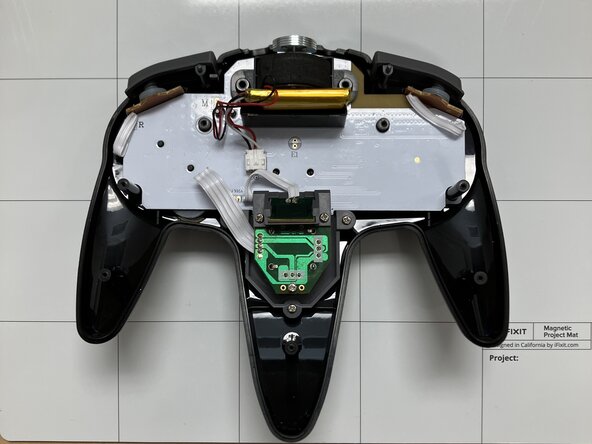
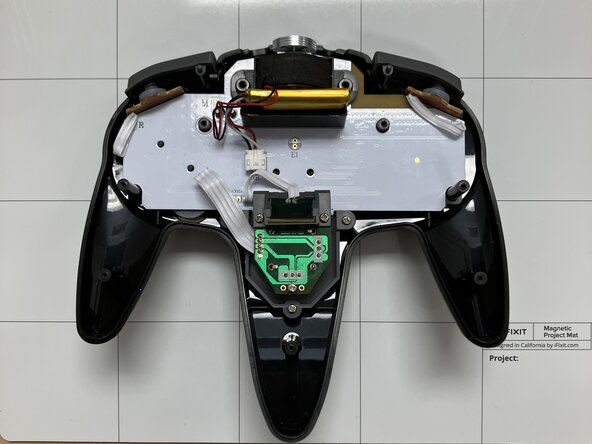
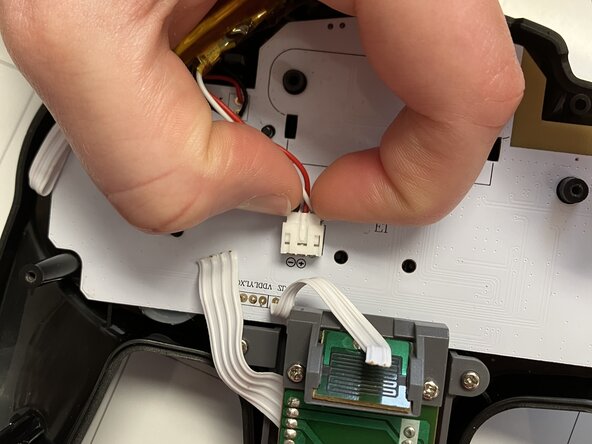
    • Squeeze the side clips on the battery connector and pull the battery cable straight out of its socket on the board.

    • Do not pull on the wires, as this can damage the connector.

  9. SAFFUN Wireless N64 Controller Rumble Motor Replacement, Rumble Motor: step 9, image 1 of 3 SAFFUN Wireless N64 Controller Rumble Motor Replacement, Rumble Motor: step 9, image 2 of 3 SAFFUN Wireless N64 Controller Rumble Motor Replacement, Rumble Motor: step 9, image 3 of 3
    • On the bottom of the motherboard, you will see an M next to where the rumble motor wires connect.

    • Carefully, flip the motherboard over so the solder joints for the rumble motor are visible.

    • Use a soldering iron to desolder the black and red wires from the solder joints on the motherboard.

    • For more information on soldering, review the How to Solder and Desolder Connections guide.

    • Use caution when handling the soldering iron—it is very hot and can damage components or cause burns.

  10. SAFFUN Wireless N64 Controller Rumble Motor Replacement: step 10, image 1 of 1
    • The rumble motor is now disconnected from the motherboard.

Conclusion

To reassemble your device, follow these instructions in reverse order.

Jacob Overcash

Member since: 09/23/25

541 Reputation

4 Guides authored

0 Guide Comments

Add Comment

View Statistics:

Past 24 Hours: 0

Past 7 Days: 0

Past 30 Days: 9

All Time: 84