Free Shipping on Domestic Orders $75+

SAFFUN Wireless N64 Controller Joystick Replacement

What you need

  1. SAFFUN Wireless N64 Controller Joystick Replacement, Back Plate: step 1, image 1 of 1
    • Before you begin, make sure the controller is disconnected and the LED indicator light is off.

  2. SAFFUN Wireless N64 Controller Joystick Replacement: step 2, image 1 of 2 SAFFUN Wireless N64 Controller Joystick Replacement: step 2, image 2 of 2
    • Use a Phillips #1 screwdriver to remove the seven 9.3 mm screws from the backplate.

  3. SAFFUN Wireless N64 Controller Joystick Replacement: step 3, image 1 of 2 SAFFUN Wireless N64 Controller Joystick Replacement: step 3, image 2 of 2
    • Use a Phillips #1 screwdriver to remove the two 9.3 mm screws.

    • Use a screwdriver with a shaft length of at least 60 mm to reach the deep-set screws.

  4. SAFFUN Wireless N64 Controller Joystick Replacement: step 4, image 1 of 3 SAFFUN Wireless N64 Controller Joystick Replacement: step 4, image 2 of 3 SAFFUN Wireless N64 Controller Joystick Replacement: step 4, image 3 of 3
    • Slide an opening pick along the edge of the rear cover to release the clips.

    • Gently remove the back plate from the controller.

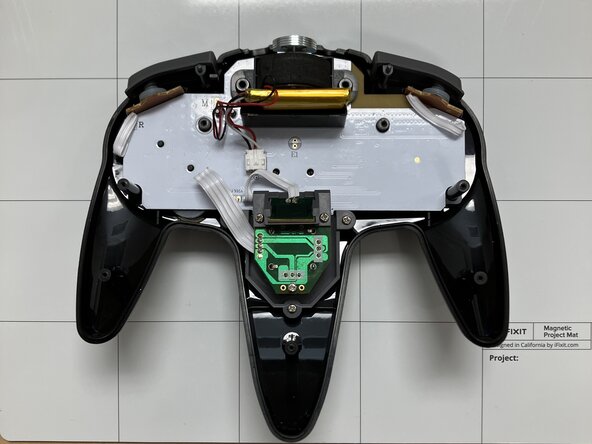
  5. SAFFUN Wireless N64 Controller Joystick Replacement, Joystick: step 5, image 1 of 3 SAFFUN Wireless N64 Controller Joystick Replacement, Joystick: step 5, image 2 of 3 SAFFUN Wireless N64 Controller Joystick Replacement, Joystick: step 5, image 3 of 3
    • Locate the joystick ribbon marked by the RED arrow.

    • Using a desoldering pump to vacuum the molten solder from the circut.

    • No need to unsolder the Z button only the ribbon of the joystick is needed.

  6. SAFFUN Wireless N64 Controller Joystick Replacement: step 6, image 1 of 3 SAFFUN Wireless N64 Controller Joystick Replacement: step 6, image 2 of 3 SAFFUN Wireless N64 Controller Joystick Replacement: step 6, image 3 of 3
    • Use a Phillips #1 screwdriver to remove the five 7.3 mm screws.

    • Set aside the Z drive holder and keep the joystick.

  7. SAFFUN Wireless N64 Controller Joystick Replacement: step 7, image 1 of 2 SAFFUN Wireless N64 Controller Joystick Replacement: step 7, image 2 of 2
    • After removing the screws and the Z button holder gently raise the joystick and put the controller aside.

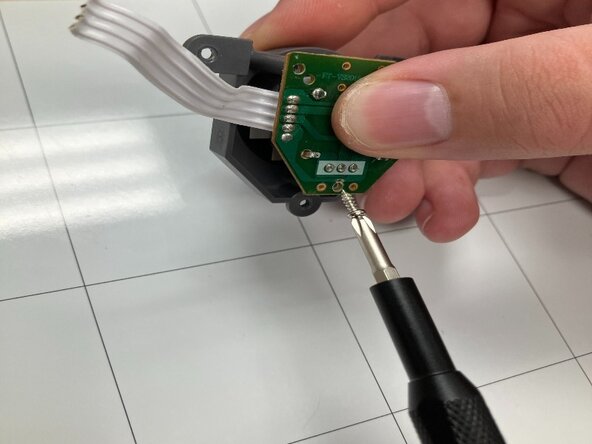
  8. SAFFUN Wireless N64 Controller Joystick Replacement: step 8, image 1 of 3 SAFFUN Wireless N64 Controller Joystick Replacement: step 8, image 2 of 3 SAFFUN Wireless N64 Controller Joystick Replacement: step 8, image 3 of 3
    • Use a Phillips #1 screwdriver to remove the remaining 3.9 mm screw from the center of the joystick board.

    • Set aside the joystick board.

  9. SAFFUN Wireless N64 Controller Joystick Replacement: step 9, image 1 of 3 SAFFUN Wireless N64 Controller Joystick Replacement: step 9, image 2 of 3 SAFFUN Wireless N64 Controller Joystick Replacement: step 9, image 3 of 3
    • Remove the analog stick by using your finger and pulling towards your person.

    • One removed use your fingers to remove the joystick from its container.

Conclusion

To reassemble your device, follow these instructions in reverse order.

Jacob Overcash

Member since: 09/23/25

541 Reputation

4 Guides authored

0 Guide Comments

Add Comment

View Statistics:

Past 24 Hours: 1

Past 7 Days: 3

Past 30 Days: 16

All Time: 153