
Royal Heat RS-100 Fuse Replacement

Long Tran and 2 other contributors
Last updated on Jan 28, 2014
Views: 1.1K
View statistics:
- Past 24 Hours:
- 4
- Past 7 Days:
- 23
- Past 30 Days:
- 84
- All Time:
- 1,117
Comments: 0
No one has left comments on this guide. Will you be first?
Go to guide commentsCompleted: 0 1
No one has marked this guide "completed." Will you be the first?
1 person has marked this guide "completed." It's you — great job!
Favorites: 0 1
No one has favorited (and subscribed to) this guide. Will you be the first?
1 person has favorited (and subscribed to) this guide — and that's you!
Incorrect Tools
Help make this guide better by using the correct tools in images and/or text.
Introduction
Go to step 1 ↓Check the fuse when the current flow through the power cord, but not through the heater coil.
What you need
Tools

-
-
-
Flip the device over so the bottom is facing up.
-
Remove the two 10mm screws holding the back panel using a Phillips #2 screwdriver.
 Ask FixBot
-
-
-
Place the Flathead Screw driver parallel with the gap between the back and the heater body, then twist until the two parts of panel are separated. You may have to do this on four sides of the panel.
-
Remove the front panel by pulling them apart. The front panel should come out easily.
-
-
-
-
-
-
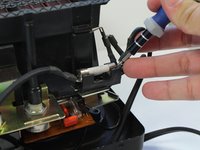
Pry one end of the fuse from the bracket until it is separated from the holder.
-
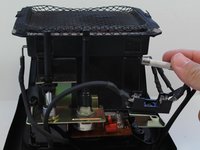
Remove the fuse by lifting it up.
-
-


To reassemble your device, follow these instructions in reverse order.

Team

Cal Poly, Team 11-35, Amido Fall 2013 Member of Cal Poly, Team 11-35, Amido Fall 2013
CPSU-AMIDO-F13S11G35
4 Members
84 Guides authored
