Free Shipping on Domestic Orders $75+

Rotor Riot Phone Connector Cable Replacement

What you need

  1. Rotor Riot Phone Connector Cable Replacement, Remove the iPhone mount: step 1, image 1 of 3 Rotor Riot Phone Connector Cable Replacement, Remove the iPhone mount: step 1, image 2 of 3 Rotor Riot Phone Connector Cable Replacement, Remove the iPhone mount: step 1, image 3 of 3
    • Use your fingers to remove the screw on the back side of the controller securing the iPhone mount.

    • Remove the iPhone mount.

    Ask FixBot

    Add Comment

  2. Rotor Riot Phone Connector Cable Replacement, Unscrew the back cover: step 2, image 1 of 1
    • Use a T6 Torx screwdriver to remove the eight 9.2 mm-long screws securing the back cover.

    • Don't try to remove the back cover all the way yet! It's still connected to the mainboard.

    Ask FixBot

    Add Comment

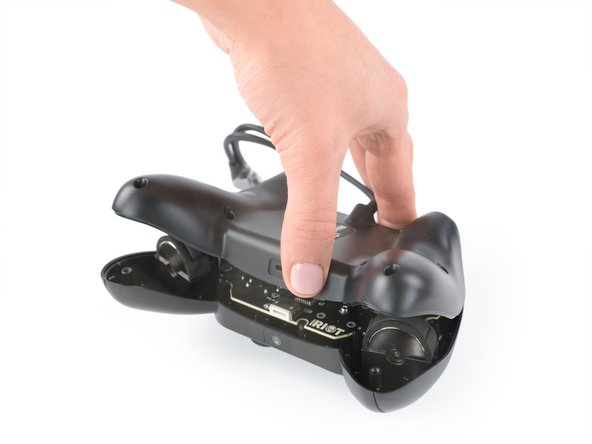
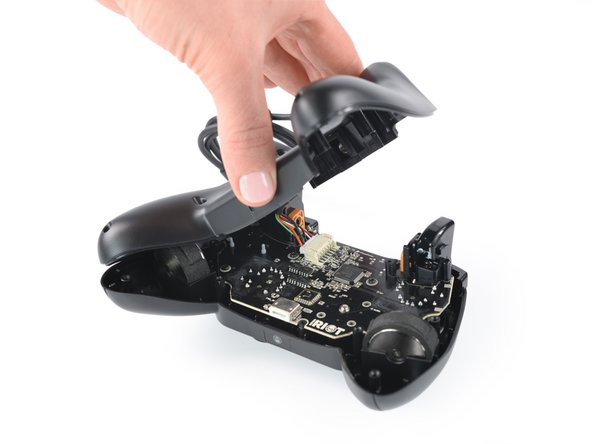
  3. Rotor Riot Phone Connector Cable Replacement, Swing open the back cover: step 3, image 1 of 3 Rotor Riot Phone Connector Cable Replacement, Swing open the back cover: step 3, image 2 of 3 Rotor Riot Phone Connector Cable Replacement, Swing open the back cover: step 3, image 3 of 3
    • Lift up the back cover of the controller.

    • Lift the back cover to a 45 degree angle and place it next to the controller.

    • Don't strain the interconnect cable during this procedure.

    Ask FixBot

    Add Comment

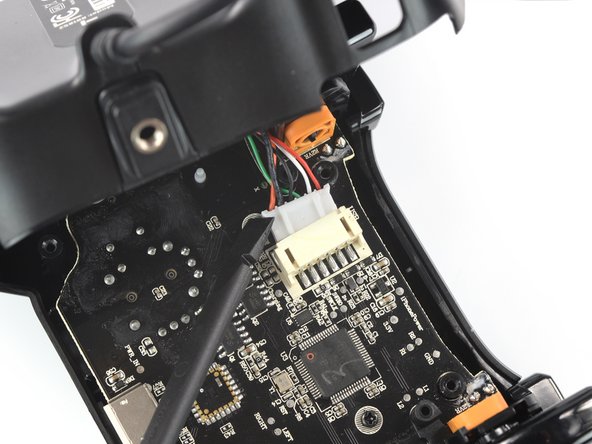
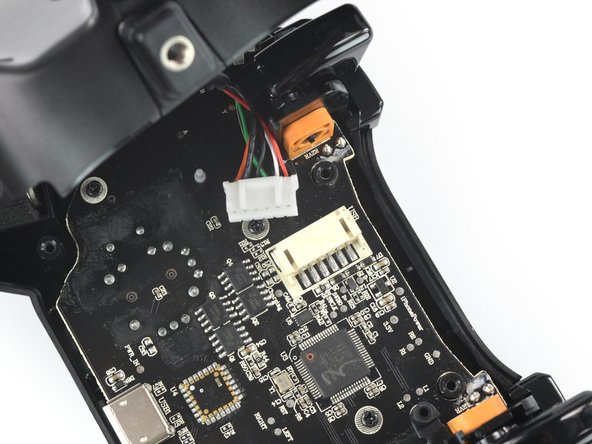
  4. Rotor Riot Phone Connector Cable Replacement, Disconnect the phone connector cable: step 4, image 1 of 3 Rotor Riot Phone Connector Cable Replacement, Disconnect the phone connector cable: step 4, image 2 of 3 Rotor Riot Phone Connector Cable Replacement, Disconnect the phone connector cable: step 4, image 3 of 3
    • Use a spudger to disconnect the phone connector cable from the mainboard.

    Ask FixBot

    Add Comment

  5. Rotor Riot Phone Connector Cable Replacement, Remove the back cover: step 5, image 1 of 1
    • Remove the back cover.

    Ask FixBot

    Add Comment

  6. Rotor Riot Phone Connector Cable Replacement, Remove the screw thread: step 6, image 1 of 3 Rotor Riot Phone Connector Cable Replacement, Remove the screw thread: step 6, image 2 of 3 Rotor Riot Phone Connector Cable Replacement, Remove the screw thread: step 6, image 3 of 3
    • Pull the screw thread bracket straight up to slide it off of the rails securing it to the back cover.

    Ask FixBot

    Add Comment

  7. Rotor Riot Phone Connector Cable Replacement, Remove the phone connector cable: step 7, image 1 of 3 Rotor Riot Phone Connector Cable Replacement, Remove the phone connector cable: step 7, image 2 of 3 Rotor Riot Phone Connector Cable Replacement, Remove the phone connector cable: step 7, image 3 of 3
    • Remove the phone connector cable.

    Ask FixBot

    Add Comment

Conclusion

To reassemble your device, follow these instructions in reverse order.

Take your e-waste to an R2 or e-Stewards certified recycler.

Repair didn’t go as planned? Ask our Answers community for help.

Cancel: I did not complete this guide.

Adriana Zwink

Member since: 12/18/19

67,597 Reputation

167 Guides authored

Team

iFixit Member of iFixit

Staff

123 Members

27,554 Guides authored

0 Guide Comments

Add Comment

View Statistics:

Past 24 Hours: 3

Past 7 Days: 7

Past 30 Days: 35

All Time: 668