Free Shipping on Domestic Orders $75+

Roland TR-505 LCD Display Replacement

  1. Roland TR-505 LCD Display Replacement, Removing the dial cap: step 1, image 1 of 1
    • Simply firmly hold the cap and carefully pull up and the cap should pop up.

  2. Roland TR-505 LCD Display Replacement, Potential Cleaning: step 2, image 1 of 1
    • Bonus Step!

    • While the cap is off it can be worth cleaning under the cap to prevent dirt from getting inside.

    • This whole guide applies for both dials as they both come off the same way.

  3. Roland TR-505 LCD Display Replacement, Removing the bottom screws: step 3, image 1 of 1
    • Remove these Philips PH1 screws

    • Not all screws are the same,make sure to keep them organised:-)

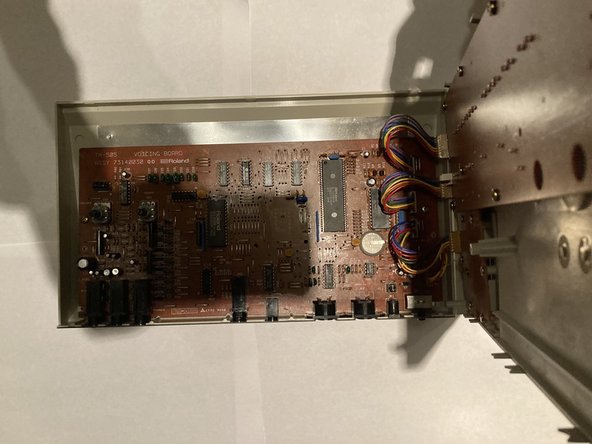
  4. Roland TR-505 LCD Display Replacement, Opening the Device: step 4, image 1 of 2 Roland TR-505 LCD Display Replacement, Opening the Device: step 4, image 2 of 2
    • Carefully separate the 2 half’s

    • If it’s not coming apart you may need a plastic pry tool to assist you

    • Once separated:with the ports facing you open the device like a book with the top panel lifted up slightly,make sure to open it to the right

  5. Roland TR-505 LCD Display Replacement, Unplugging the connectors: step 5, image 1 of 1
    • Carefully unplug the connectors from their sockets by pulling on the tabs that stick out from the cable

    • Do not pull on the cable itself as you risk pulling the cables out of the connector

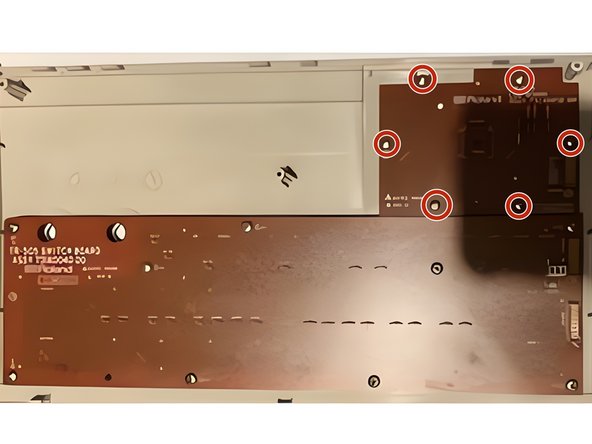
  6. Roland TR-505 LCD Display Replacement, Disassembling the top half: step 6, image 1 of 1
    • with the connectors disconnected you can lift the top half away.

    • to take the LCD out, take out these PH 1 Philips screws

  7. Roland TR-505 LCD Display Replacement, Removing the LCD: step 7, image 1 of 1
    • You can now carefully remove the LCD

    • try not to touch the front for the LCD as that will put finder prints onto it, these can be hard to remove and can scratch the LCD(same apples for the plastic lens on the front

Conclusion

To reassemble your device, follow these instructions in reverse order.

One other person completed this guide.

HelloMacOS

Member since: 01/24/22

27,404 Reputation

11 Guides authored

Team

Repair is War on Entropy Member of Repair is War on Entropy

Community

36 Members

1,614 Guides authored

0 Guide Comments

Add Comment

View Statistics:

Past 24 Hours: 1

Past 7 Days: 3

Past 30 Days: 33

All Time: 764