
Rocketfish RF-WSP313 Speaker Replacement

Kara Falknor and 3 other contributors
Last updated on May 7, 2024
Views: 1.1K
View statistics:
- Past 24 Hours:
- 2
- Past 7 Days:
- 17
- Past 30 Days:
- 67
- All Time:
- 1,122
Comments: 0
No one has left comments on this guide. Will you be first?
Go to guide commentsCompleted: 0 1
No one has marked this guide "completed." Will you be the first?
1 person has marked this guide "completed." It's you — great job!
Favorites: 0 1
No one has favorited (and subscribed to) this guide. Will you be the first?
1 person has favorited (and subscribed to) this guide — and that's you!
Introduction
Go to step 1 ↓This guide will show you how to remove the components of the product necessary to access the bluetooth speaker, remove it, and replace it with a new one.
What you need
Tools


-
-
-
Using the metal spudger, remove the outer cap from the top of the device.
 Ask FixBot
-
-
-
Using a Phillips # 1 screwdriver, remove the four 1.1 cm flathead screws attaching the metal ring to the top of the device.
-
-
-
Using a Phillips # 1 screwdriver, remove the four 1.1 sm screws attaching the metal ring to the bottom of the device.
-
-
-
-
Using a Phillips # 1 screwdriver, remove the four 1 cm screws from the outside panel. You will do this for each panel; it does not matter which side you start with.
-
-
-
Using the metal spudger, pry off the side panel. Repeat this step on the other side panel.
-
-
-
Using a Phillips #1 screwdriver, remove the four 1.1 cm flathead screws from the side of the device. Repeat this step on the other side of the device.
-
-
Tool used on this step:Tweezers$4.99
-
Using your fingers (or a pair of tweezers), disconnect the speaker cord from its socket.
-
-
-
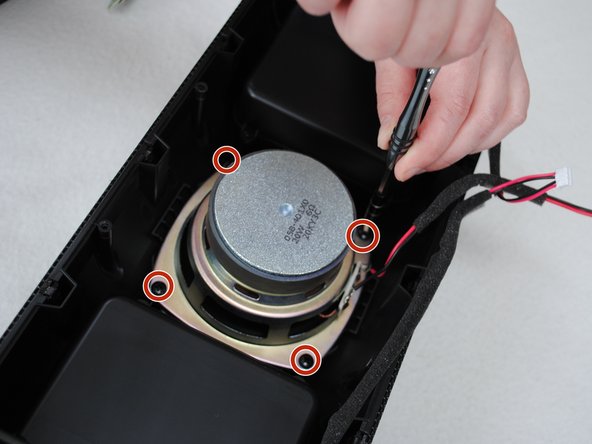
Using a Phillips #1 screwdriver, remove the four 1.2 cm pan head screws surrounding the speaker.
-
-



To reassemble your device, follow these instructions in reverse order.

Team

Washington State, Team 1-50, Staggers Spring 2017 Member of Washington State, Team 1-50, Staggers Spring 2017
WSU-STAGGERS-S17S1G50
2 Members
12 Guides authored
