Introduction
If you are experiencing issues with the power source of your Ring Stick Up Cam Battery (3rd generation, model number 5UM7E5), this guide will help you access the battery to charge or replace it. Since the battery is a quick release, you will not need any tools to access and extract the battery. We recommend having either the Ring charging port or a MicroUSB cord for charging.
-
-
Turn the camera so the lens is facing away from you, and the back is facing towards you.
-
Place one hand securely on the base and the other on the stand.
-
Carefully twist your bottom hand counterclockwise until the indicator line reaches the unlock icon.
 Ask FixBot
-
-
-
-
Hold the camera so the opening containing the battery is toward the ceiling.
-
Squeeze the silver lever labeled "push" and extract the battery from its slot.
-


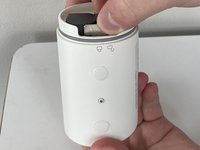
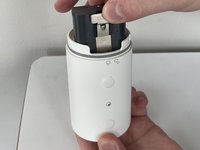
To reassemble your device, follow these instructions in reverse order.

Team

Marist, Team 1-1, Chaterdon Spring 2023 Member of Marist, Team 1-1, Chaterdon Spring 2023
MARS-CHATERDON-S23S1G1
3 Members
8 Guides authored
