Introduction
This guide is to help users replace their faulty switch for the Ridgid GEN5X R8642 saw. For this guide you will need: a soldering iron, a spudger, a T20 Torx Screwdriver, a J1 size Phillips head screwdriver, and a replacement switch for Ridgid GEN5X R8642, and a good attitude.
What you need
-
-
Remove the plastic tab holding the handle cover in place by prying upward with the spudger until the tab pops off.
 Ask FixBot
-
-
-
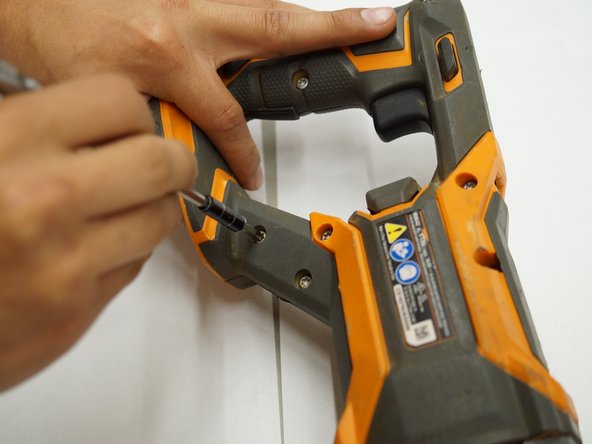
Use a T20 Torx screwdriver to remove the nine M4 X 16mm screws from the plastic housing.
-
-
-
-
Use a JIS #1 screwdriver to remove the two M4 x 25mm screws on both sides of the metal housing.
-
-
-
Remove one half of the plastic housing using a spudger so that the internal system is exposed.
-
-
-
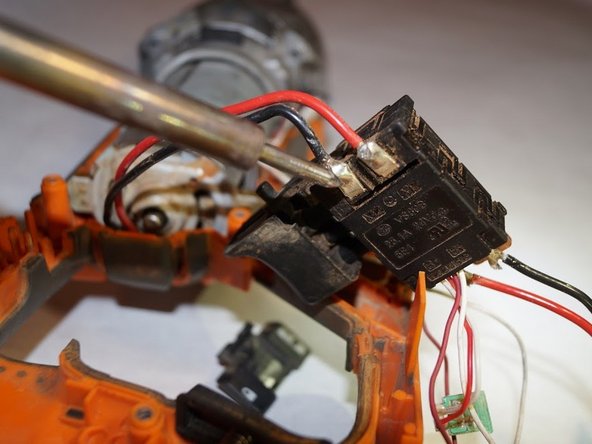
Remove the plastic wire covers to the red and black connections on the switch assembly.
-






To reassemble your device, follow these instructions in reverse order.

Team

Western Carolina University, Team S1-G3, Virtue Spring 2019 Member of Western Carolina University, Team S1-G3, Virtue Spring 2019
WCU-VIRTUE-S19S1G3
4 Members
5 Guides authored
