Introduction
This guide will show the steps to remove the outer case for the Ricoh Theta S. Be aware that any replacement of disassembly of the original product may void the manufacturer warranty.
What you need
-
-
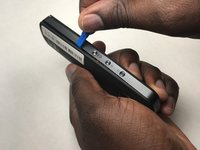
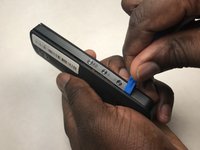
Wedge the spudger underneath the small plastic square located on the bottom of the device.
-
Move the spudger to remove the plastic cover.
 Ask FixBot
-
-
-
-
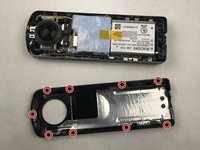
Remove the four 3-mm screws located on the bottom of the device. You will need to use the Phillips 00 screwdriver.
-
-
-
Insert the plastic opening tool in between the panels shown.
-
Apply pressure to unlatch the 9 spring clips located around the perimeter of the device.
-
Lift the panel from the device.
-


To reassemble your device, follow these instructions in reverse order.
Cancel: I did not complete this guide.
2 other people completed this guide.

Team

IUPUI, Team S3-G1, Harley Fall 2017 Member of IUPUI, Team S3-G1, Harley Fall 2017
IUPUI-HARLEY-F17S3G1
3 Members
6 Guides authored
