
RetroMini Miyoo Mini Plus Battery Replacement

Kaden and 2 other contributors
Last updated on Dec 19, 2024
Views: 3.3K
View statistics:
- Past 24 Hours:
- 6
- Past 7 Days:
- 73
- Past 30 Days:
- 297
- All Time:
- 3,326
Comments: 1
1 guide comment.
Go to guide commentsCompleted: 1 2
1 person has marked this guide "completed." Will you be next?
2 people have marked this guide "completed." Including you — great job!
Favorites: 0 1
No one has favorited (and subscribed to) this guide. Will you be the first?
1 person has favorited (and subscribed to) this guide — and that's you!
Introduction
Go to step 1 ↓If your RetroMini Miyoo Mini Plus seems to not hold a charge or turns off frequently. If so here is a guide to replacing the battery. While the guide can be done with only your hands, it may be easier with a small flat head screwdriver or IFixit Opening Tool.
What you need
Tools


-
-
-
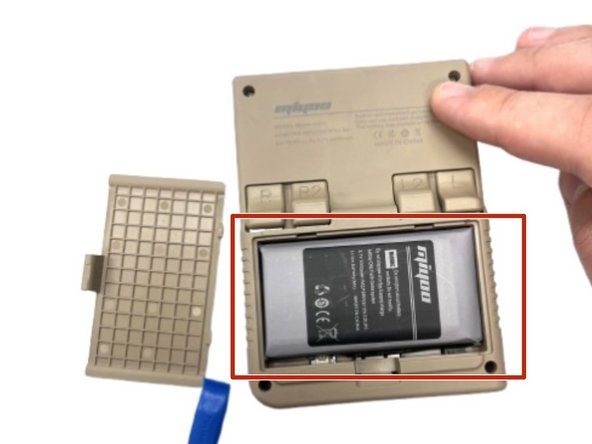
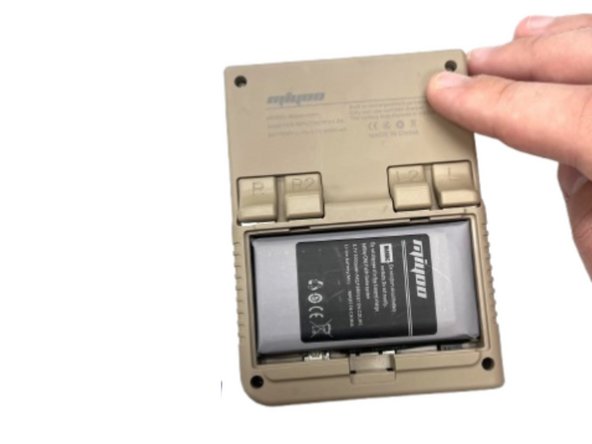
Use your fingernail to push in the battery compartment tab.
-
Lift the cover up to expose the battery.
-
-
-
Use an opening tool to gently lift the the battery from its compartment.
-
Gently pull the battery out and set the battery next to the system, with care not to strain the attached wire.
-
-
-
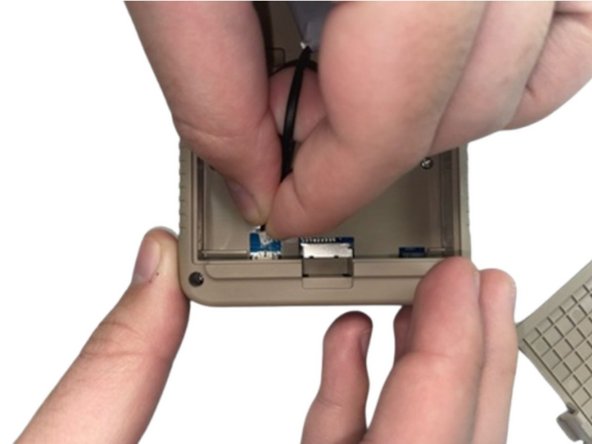
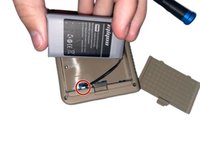
Pinch the white battery connector and pull it directly out of its socket.
-
Completely remove the battery.
-
-
-
-
When you have the new battery, put the new battery wire into the connecter.
-
Place the battery back into the empty space with the wire at the bottom of the battery.
-


 Ask FixBot




To reassemble your device, follow the above steps in reverse order.
For optimal performance, after completing this guide, calibrate your newly installed battery.
Take your e-waste to an R2 or e-Stewards certified recycler.
Repair didn’t go as planned? Try some basic troubleshooting, or ask our Steam Deck answers community for help.
Cancel: I did not complete this guide.
One other person completed this guide.

Team

University of North Texas, Team 5-2, Kilpatrick Fall 2024 Member of University of North Texas, Team 5-2, Kilpatrick Fall 2024
UNT-KILPATRICK-F24S5G2
4 Members
48 Guides authored
1 Guide Comment
Does anyone know where to get these batteries? Or perhaps the specs of the Miyoo Mini Plus battery such as dimensions (mine is a bit obese right now) and connector type?
