Resealing Procedure

Dominik Schnabelrauch and 2 other contributors
Last updated on Oct 18, 2023
Views: 25K
View statistics:
- Past 24 Hours:
- 13
- Past 7 Days:
- 98
- Past 30 Days:
- 490
- All Time:
- 25,370
Comments: 7
5 comments on steps, 2 guide comments.
Go to guide commentsCompleted: 16 17
16 people have marked this guide "completed." Will you be next?
17 people have marked this guide "completed." Including you — great job!
Favorites: 2 3
2 people have favorited (and subscribed to) this guide. Will you be next?
3 people have favorited (and subscribed to) this guide — including you!
Introduction
Go to step 1 ↓Use this guide to close and reseal your Apple Watch Series 4 after disassembly.
What you need
Tools


-
-
-
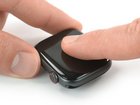
Align the screen and press it down firmly onto the adhesive.
-
For best results, apply heat from your iOpener, heat gun, or hair dryer to help set the adhesive.
-
After the screen sits in place apply some pressure for a few hours by wrapping the watch with a couple rubber bands, or placing it under a heavy book or two.
-
-

 Ask FixBot


Take your e-waste to an R2 or e-Stewards certified recycler.
Repair didn’t go as planned? Check out our Answers community for troubleshooting help.
Cancel: I did not complete this guide.
16 other people completed this guide.


2 Guide Comments
Ist der Kasten dann auch, zumindest theoretisch, wasserdicht?
Ja. An den kritischen Stellen - Öffnungen für Mikro, Lautsprecher, Digital Crown, Druckknopf - wurde ja nichts gemacht.
