Free Shipping on Domestic Orders $75+

Replacing Motorola V60i Logic Board

What you need

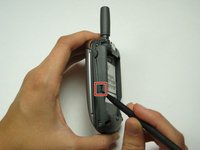
  1. Replacing Motorola V60i Logic Board, Battery: step 1, image 1 of 2 Replacing Motorola V60i Logic Board, Battery: step 1, image 2 of 2
    • Flip the phone over so the back cover is facing up.

    • Using either a finger or a spudger, press the button located near the top of the phone by the antenna.

    Ask FixBot

    Add Comment

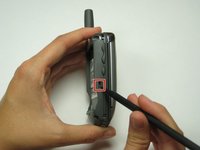
  2. Replacing Motorola V60i Logic Board: step 2, image 1 of 2 Replacing Motorola V60i Logic Board: step 2, image 2 of 2
    • Pry up the back plate from the phone.

    • Push the button near the bottom of the battery using either your finger or the spudger to release the battery.

    Ask FixBot

    Add Comment

  3. Replacing Motorola V60i Logic Board, Back Plate: step 3, image 1 of 1
    • Using a T6 Torx screwdriver, remove the four screws from the back of the phone.

    Ask FixBot

    Add Comment

  4. Replacing Motorola V60i Logic Board: step 4, image 1 of 2 Replacing Motorola V60i Logic Board: step 4, image 2 of 2
    • Simultaneously press the highlighted buttons on both sides of phone.

    Ask FixBot

    Add Comment

  5. Replacing Motorola V60i Logic Board: step 5, image 1 of 1
    • Separate the back plate from the rest of phone.

    • Do not pull the wire connecting the front and back plates.

    Ask FixBot

    Add Comment

  6. Replacing Motorola V60i Logic Board, Motherboard: step 6, image 1 of 1
    • Gently lift logic board from back plate.

    Ask FixBot

    Add Comment

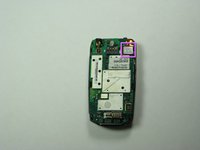
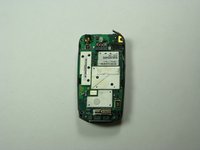
  7. Replacing Motorola V60i Logic Board: step 7, image 1 of 2 Replacing Motorola V60i Logic Board: step 7, image 2 of 2
    • Place logic board on front cover.

    • Unsnap orange wire that connects the logic board to keypad sensor to allow the logic board to move freely.

    Ask FixBot

    Add Comment

Conclusion

To reassemble your device, follow these instructions in reverse order.

Cancel: I did not complete this guide.

Elizabeth OBrien

Member since: 04/26/10

52 Reputation

7 Guides authored

Team

Cal Poly, Team 30-40, Garner Spring 2010 Member of Cal Poly, Team 30-40, Garner Spring 2010

CPSU-GARNER-S10S30G40

4 Members

26 Guides authored

1 Guide Comment

Quero comprar esse aparelho, alguém tem para vender?

Karison Mesquita - Reply Share

Add Comment

View Statistics:

Past 24 Hours: 2

Past 7 Days: 11

Past 30 Days: 38

All Time: 2,576