Introduction
The same instructions can also be used to replace the original hard drive (SATA 500 GB, 5'400 rpm) with a more powerful hard drive or an SSD hard drive.
What you need
-
-
-
Turn off the computer.
-
Take the slide unlocked into position, remove the battery.
 Ask FixBot
-
-
-
-
-
-
Using the Phillips # 1 screwdriver, remove the hard drive cover.
-
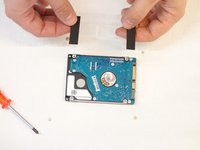
Grasp the transparent tab to separate the hardtop from the SATA connector.
-
-
-
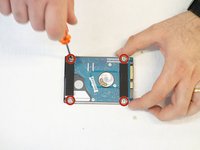
Using the Phillips # 1 screwdriver, remove the four screws securing the plastic cover.
-
This cover is then reinstalled on the new hard drive.
-
-


For reassembly, follow the instructions in reverse order.
Cancel: I did not complete this guide.
One other person completed this guide.
Special thanks to these translators:
100%


These translators are helping us fix the world! Want to contribute?
Start translating ›

