Free Shipping on Domestic Orders $75+

Repairing Sony Xperia L Volume Control Button

What you need

    1. Repairing Sony Xperia L Volume Control Button, Open the phone case: step 1, image 1 of 3 Repairing Sony Xperia L Volume Control Button, Open the phone case: step 1, image 2 of 3 Repairing Sony Xperia L Volume Control Button, Open the phone case: step 1, image 3 of 3
      • The Xperia L model

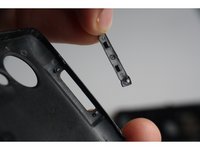
      • Gently open the phone case.

      • The phone body, back case and the detached volume control button.

      Ask FixBot

      Add Comment

    2. Repairing Sony Xperia L Volume Control Button, Adjust the plastic notches using the plastic opening tools.: step 2, image 1 of 2 Repairing Sony Xperia L Volume Control Button, Adjust the plastic notches using the plastic opening tools.: step 2, image 2 of 2
      • Using the plastic opening tools in the iFixit kit, pull up the flattened plastic notches that will hold the volume control button in place.

      • You can see the notches on the back case and the holes in the volume control button that snap fit in them.

      Ask FixBot

      Add Comment

    3. Repairing Sony Xperia L Volume Control Button, Place the button and snap it to the back case using the raised notches.: step 3, image 1 of 2 Repairing Sony Xperia L Volume Control Button, Place the button and snap it to the back case using the raised notches.: step 3, image 2 of 2
      • Place the volume control button back in the slot.

      • Adjust the holes on the button in a way that they snap to the raised notches on the back panel.

      • Press down the raised plastic notches using the back of the plastic opening tool from the kit.

      Ask FixBot

      Add Comment

    4. Repairing Sony Xperia L Volume Control Button, Snap the back case to the phone body.: step 4, image 1 of 3 Repairing Sony Xperia L Volume Control Button, Snap the back case to the phone body.: step 4, image 2 of 3 Repairing Sony Xperia L Volume Control Button, Snap the back case to the phone body.: step 4, image 3 of 3
      • The volume control button is now attached in its slot.

      • Reassemble the phone back by snapping the back case to the phone body.

      • The volume control/zoom button is good to use!

      Ask FixBot

      Add Comment

Conclusion

To reassemble your device, follow these instructions in reverse order.

Cancel: I did not complete this guide.

3 other people completed this guide.

Ruchita

Member since: 10/22/15

97 Reputation

1 Guide authored

Team

PIRL Gadget Garage Member of PIRL Gadget Garage

Community

9 Members

48 Guides authored

0 Guide Comments

Add Comment

View Statistics:

Past 24 Hours: 1

Past 7 Days: 12

Past 30 Days: 38

All Time: 3,005