
Removing the Dell Inspiron 1150 Keyboard

Richdave and 3 other contributors
Last updated on Jul 8, 2025
Views: 1.4K
View statistics:
- Past 24 Hours:
- 2
- Past 7 Days:
- 28
- Past 30 Days:
- 105
- All Time:
- 1,438
Comments: 0
No one has left comments on this guide. Will you be first?
Go to guide commentsCompleted: 1 2
1 person has marked this guide "completed." Will you be next?
2 people have marked this guide "completed." Including you — great job!
Favorites: 1 2
1 person has favorited (and subscribed to) this guide. Will you be next?
2 people have favorited (and subscribed to) this guide — including you!
Community-Contributed Guide
An awesome member of our community made this guide. It was not created by iFixit staff.
Introduction
Go to step 1 ↓This guide will show you how to remove the keyboard on your Dell 1150 laptop
What you need
Tools
-
Spudger4.9


-
-
-
Place the laptop upside down on a clean, flat surface.
-
Locate the battery release button with the padlock symbol above it.
-
Slide the battery release button towards the padlock symbol and hold it there. Note that the button is spring loaded and will return if released.
-
Gently remove the battery from the side of the laptop.
 Ask FixBot
-
-
-
-
-
Use a spudger to lift the notched right edge of the hinge cover, and pry it loose
-
Lift the hinge cover off and set aside
-
-
-
-
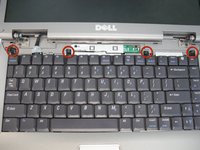
Remove 4ea M2 x 3mm keyboard screws
-
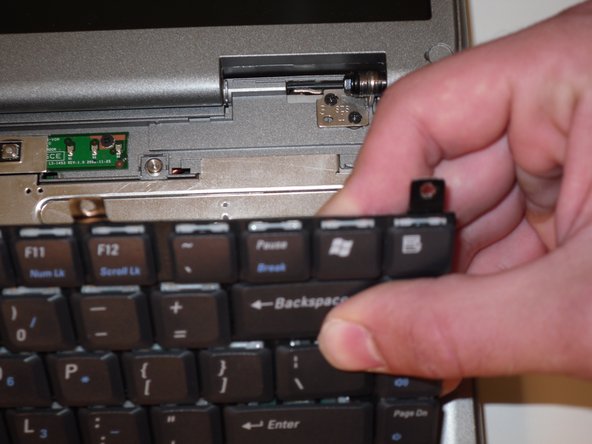
Lift up keyboard from the rear to expose the connector below
-
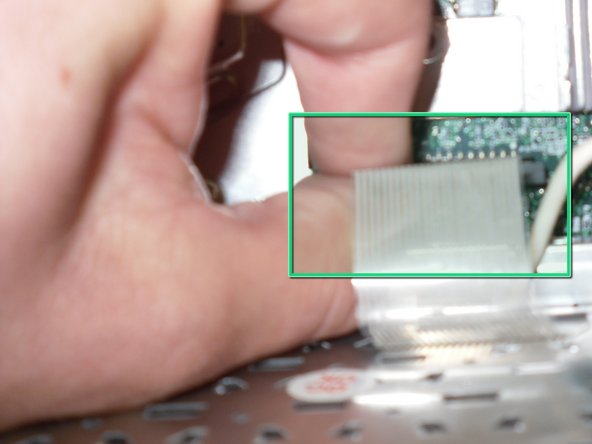
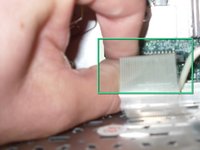
Disconnect the keyboard ribbon cable from the mother board
-
-


To reassemble your device, follow these instructions in reverse order.
Cancel: I did not complete this guide.
One other person completed this guide.


