Free Shipping on Domestic Orders $75+

Removing Playstation 2 Slimline SCPH-7500x Outer Shell

What you need

      • Turn off the PlayStation 2 and carefully unplug it from the power source. Also, it is important to eject the CD from the console before flipping the it upside down.

      Ask FixBot

      Add Comment

    1. Removing Playstation 2 Slimline SCPH-7500x Outer Shell: step 2, image 1 of 1
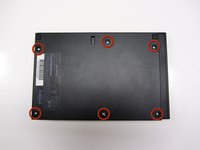
      • Locate the six feet on the bottom of the PS2.

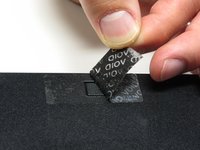
      • Five of these feet are in plain sight while the last foot is located under the black void sticker on the back of the device.

      • Some versions of the console, such as the PAL Version, may not have this sticker. In this case, the foot or the screw should be in plain sight.

      Ask FixBot

      Add Comment

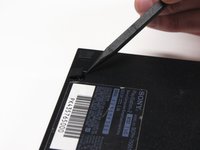
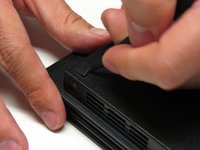
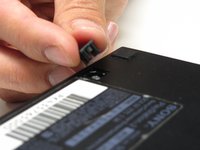
    2. Removing Playstation 2 Slimline SCPH-7500x Outer Shell: step 3, image 1 of 3 Removing Playstation 2 Slimline SCPH-7500x Outer Shell: step 3, image 2 of 3 Removing Playstation 2 Slimline SCPH-7500x Outer Shell: step 3, image 3 of 3
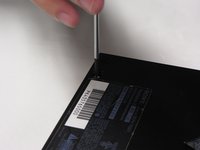
      • Remove the five visible feet from the bottom of the device using a spudger.

      Ask FixBot

      Add Comment

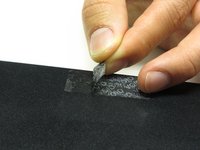
    3. Removing Playstation 2 Slimline SCPH-7500x Outer Shell: step 4, image 1 of 2 Removing Playstation 2 Slimline SCPH-7500x Outer Shell: step 4, image 2 of 2
      • Remove the sticker and then remove the 6th foot.

      Ask FixBot

      Add Comment

    4. Removing Playstation 2 Slimline SCPH-7500x Outer Shell: step 5, image 1 of 3 Removing Playstation 2 Slimline SCPH-7500x Outer Shell: step 5, image 2 of 3 Removing Playstation 2 Slimline SCPH-7500x Outer Shell: step 5, image 3 of 3
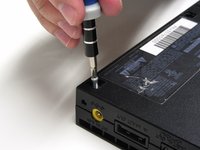
      • After all of the feet have been removed, Use a Phillips #1 screwdriver to remove the six 4.0mm screws from the base of the PS2.

      Ask FixBot

      Add Comment

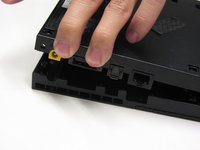
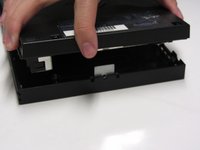
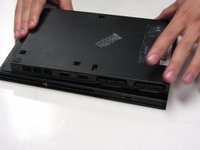
    5. Removing Playstation 2 Slimline SCPH-7500x Outer Shell: step 6, image 1 of 3 Removing Playstation 2 Slimline SCPH-7500x Outer Shell: step 6, image 2 of 3 Removing Playstation 2 Slimline SCPH-7500x Outer Shell: step 6, image 3 of 3
      • Once all of the screws have been removed, pry apart the plastic covers. Start by lifting the side containing the power cable and Ethernet port. Then, lift the opposite side to fully separate the two sides.

      • You may need to apply some gentle force to detach the covers. Be careful not to break the plastic screw pins.

      Ask FixBot

      Add Comment

    6. Removing Playstation 2 Slimline SCPH-7500x Outer Shell: step 7, image 1 of 1
      • If done correctly, you should have a fully detached plastic backing, revealing the electronic components of the PlayStation 2.

      Ask FixBot

      Add Comment

Conclusion

To reassemble your device, follow these instructions in reverse order.

Cancel: I did not complete this guide.

12 other people completed this guide.

Jared Hirata

Member since: 04/09/13

1,071 Reputation

7 Guides authored

Team

Cal Poly, Team 17-4, Regan Spring 2013 Member of Cal Poly, Team 17-4, Regan Spring 2013

CPSU-REGAN-S13S17G4

3 Members

84 Guides authored

0 Guide Comments

Add Comment

View Statistics:

Past 24 Hours: 0

Past 7 Days: 22

Past 30 Days: 98

All Time: 3,932