Free Shipping on Domestic Orders $75+

Removing HP Compaq dx2000MT PCI Cards

Views: 6K

View statistics:

Past 24 Hours:
3
Past 7 Days:
23
Past 30 Days:
96
All Time:
6,001
Comments: 2

2 comments on steps.

Completed: 8

8 people have marked this guide "completed." Will you be next?

Favorites: 10

10 people have favorited (and subscribed to) this guide. Will you be next?

Time Required: 1 minute
Difficulty: Very easy
Removing HP Compaq dx2000MT PCI Cards

Introduction

Go to step 1 ↓

This guide will show you how to remove a PCI card on your HP Compaq dx2000MT.

What you need

Tools

    1. Removing HP Compaq dx2000MT PCI Cards, Removing the HP Compaq dx2000MT Case Doors: step 1, image 1 of 1
      • Turn off your computer and remove the power cable by pulling it straight out of its socket.

      Ask FixBot

      Add Comment

    2. Removing HP Compaq dx2000MT PCI Cards: step 2, image 1 of 2 Removing HP Compaq dx2000MT PCI Cards: step 2, image 2 of 2
      • Remove the two Phillips #2 screws that secure the case door to the device.

      Ask FixBot

      Add Comment

    3. Removing HP Compaq dx2000MT PCI Cards: step 3, image 1 of 3 Removing HP Compaq dx2000MT PCI Cards: step 3, image 2 of 3 Removing HP Compaq dx2000MT PCI Cards: step 3, image 3 of 3
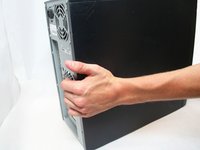
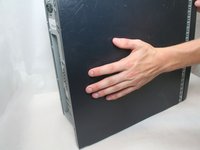
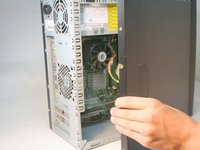
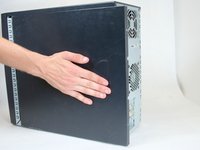
      • Remove the side case door by pushing towards the rear of the device with your hand.

      • This may take considerable force so keep pushing!

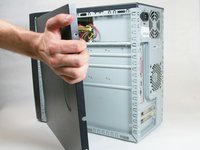
      • Once you slide the door back, remove it by pulling it outwards from the device.

      Ask FixBot

      Add Comment

    4. Removing HP Compaq dx2000MT PCI Cards: step 4, image 1 of 1
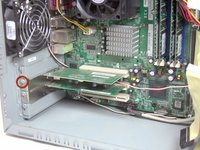
      • Remove the two Torx T15 screws that secure the case door to the device.

      Ask FixBot

      Add Comment

    5. Removing HP Compaq dx2000MT PCI Cards: step 5, image 1 of 3 Removing HP Compaq dx2000MT PCI Cards: step 5, image 2 of 3 Removing HP Compaq dx2000MT PCI Cards: step 5, image 3 of 3
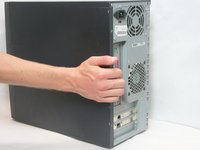
      • Remove the side case door by pushing towards the rear of the device with your hand.

      • Once again, this may take considerable force.

      • Once you slide the door back, remove it by pulling it outwards from the device.

      Ask FixBot

      Add Comment

    1. Removing HP Compaq dx2000MT PCI Cards, PCI Cards: step 6, image 1 of 2 Removing HP Compaq dx2000MT PCI Cards, PCI Cards: step 6, image 2 of 2
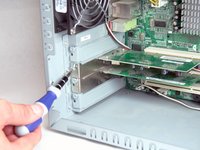
      • Remove the Torx T15 screwdriver holding the PCI card in place.

      Ask FixBot

      Add Comment

    2. Removing HP Compaq dx2000MT PCI Cards: step 7, image 1 of 1
      • Remove the PCI card by pulling it out towards the side of the device.

      • Be careful about touching the top and bottom of the card! The static electricity in your fingers could short it. If you can, only touch the metal bracket and the sides of the card.

      Ask FixBot

      Add Comment

Conclusion

To reassemble your device, follow these instructions in reverse order.

Cancel: I did not complete this guide.

8 other people completed this guide.

Logan Pace

Member since: 10/12/11

2,450 Reputation

9 Guides authored

Team

Cal Poly, Team 17-16, Regan Fall 2011 Member of Cal Poly, Team 17-16, Regan Fall 2011

CPSU-REGAN-F11S17G16

4 Members

120 Guides authored

0 Guide Comments

Add Comment

View Statistics:

Past 24 Hours: 3

Past 7 Days: 23

Past 30 Days: 96

All Time: 6,001