
Remote shutter mod (wired)

Matej Cermak and one other contributor
Last updated on Apr 17, 2018
Views: 3.9K
View statistics:
- Past 24 Hours:
- 3
- Past 7 Days:
- 17
- Past 30 Days:
- 98
- All Time:
- 3,864
Comments: 0
No one has left comments on this guide. Will you be first?
Go to guide commentsCompleted: 0 1
No one has marked this guide "completed." Will you be the first?
1 person has marked this guide "completed." It's you — great job!
Favorites: 0 1
No one has favorited (and subscribed to) this guide. Will you be the first?
1 person has favorited (and subscribed to) this guide — and that's you!
Needs More Images
A few more images would make this guide's procedures crystal clear.
Community-Contributed Guide
An awesome member of our community made this guide. It was not created by iFixit staff.
Missing Details
Some of this guide's details are missing. Help users by adding tools, difficulty, or time.
Introduction
Go to step 1 ↓This guide is not complete and not tested by me!
First generation of RX100 did not feature Sony's "Multi-terminal" port and therefore there is not any option to remote the camera's shutter
This guide shows a way how to add an option of remote control of shutter via camera's micro USB port.
You need some advanced (dis)assembling and soldering skills.
The point of this mod is just ability to simulate pressing the shutter button, using extension from shutter button line to usb port. This mod will not allow you to use a focus button, while you have just single unused pin in usb port. Other pins are in use, so it's not possible to use more pins of usb port. But you can of course find a pin on mainboard which is connected to focus button and line it out of the camera another way.
What you need


-
-
-
I will hopefully add more details in the future.
 Ask FixBot
-
-
-
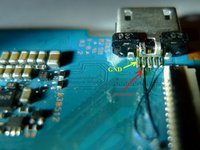
Use thin short piece of wire and decide where to put it so it will not be in interference with other components inside assembled camera. The wire will be connected to both sides of the main board.
-
Cut required length of the wire and cut the insulation on its ends.
-
Optional: use some electrical adhesive tape (not very sticky) to hold the wire on the right place while soldering. Watch where are you putting it - not over any small sensitive components
-
Solder the wire to the pins as on the pictures
-
-
-
Insert the modified mainboard, put everything to its place and close the camera. Simply reverse the disassembly procedure
-
-
-
-
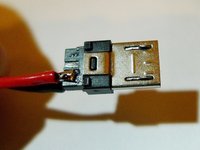
Use some standard micro USB male connector/cable
-
You can connect some remote shutter to it, or just a button which allows the lines to connect.
-
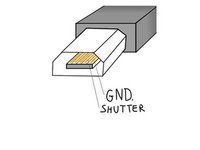
Pinout as is on the picture
-
sorry for the drawing of microUSB, it looks like half female (because of the inside) and half male. It's supposed to be male connector. But the positions of the pins are correct.
-
-


I am not author of the mod, but I will definitely try it in the future.
Pictures are taken from here:
http://przewodnicy.zakopane.pl/rozne/RX1...
Short demonstration is visible here:
https://www.youtube.com/watch?v=3m_yFcxR...
Unfortunately I don't have an option to use any soldering iron or my small tools at the moment, so I will not try it during this year (2017). But it's good to have this guide here.

