
Rear Cover Removal

Nelson Oliveira and 4 other contributors
Last updated on Mar 12, 2024
Views: 976
View statistics:
- Past 24 Hours:
- 2
- Past 7 Days:
- 22
- Past 30 Days:
- 85
- All Time:
- 976
Comments: 2
2 guide comments.
Go to guide commentsCompleted: 1 2
1 person has marked this guide "completed." Will you be next?
2 people have marked this guide "completed." Including you — great job!
Favorites: 0 1
No one has favorited (and subscribed to) this guide. Will you be the first?
1 person has favorited (and subscribed to) this guide — and that's you!
Community-Contributed Guide
An awesome member of our community made this guide. It was not created by iFixit staff.
Introduction
Go to step 1 ↓The purpose of this guide is to apply the best practices for opening this product.
What you need
Tools


-
-
-
First ensure your laptop is turned off and check if you have the necessary tools
 Ask FixBot
-
-
-
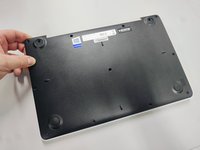
All screws are identified by circles. Pay special attention to the yellow circles, as the rubber feet hide screws.
-
-
-
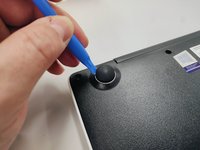
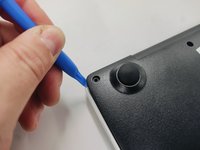
With the opening tool, remove a rubber foot.
-
For this action you will have to exert some force, because the foot is glued with a resistant glue.
-
-
-
Remove all screws with a Philips screwdriver PH1
-
All screws are the same so don't worry about identifying them.
-
-
-
-
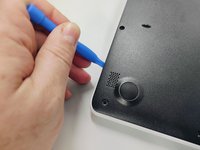
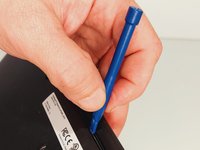
With the plastic tool, insert between the plastics and gently pry open.
-
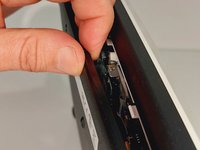
With your fingers continue to force open the bottom cover on the side indicated in the figure.
-
You will feel and hear several clicks, perfectly normal, nothing is breaking. Remove the cover completely.
-
-
-
Finally, we have the laptop open and ready to replace most of its components. Look elsewhere on how to replace a component.
-
To close the laptop just follow this guide in reverse.
-
-





Cancel: I did not complete this guide.
One other person completed this guide.

2 Guide Comments
No, do not need. Just need to remove battery. Very soon I will post a new instruction how to do it. Be insure to don't perfurate or blend the battery. It is fixed with a double tape.
