
Razor AW Kick Wheelie Bar Replacement

Alexander Vazquez and one other contributor
Last updated on Sep 8, 2026
Views: 867
View statistics:
- Past 24 Hours:
- 7
- Past 7 Days:
- 21
- Past 30 Days:
- 117
- All Time:
- 867
Comments: 0
No one has left comments on this guide. Will you be first?
Go to guide commentsCompleted: 0 1
No one has marked this guide "completed." Will you be the first?
1 person has marked this guide "completed." It's you — great job!
Favorites: 0 1
No one has favorited (and subscribed to) this guide. Will you be the first?
1 person has favorited (and subscribed to) this guide — and that's you!
Needs More Images
A few more images would make this guide's procedures crystal clear.
Introduction
Go to step 1 ↓If the wheelie bar on your Razor AW Kick Scooter is worn out or it's affecting your performance, follow this guide to replace it or remove it altogether.
A wheelie bar is a scooter part that can be used for performing tricks or as a footrest stand when using the scooter for transportation.
What you need
Tools

-
-
-
Place the scooter on its side and on the ground.
-
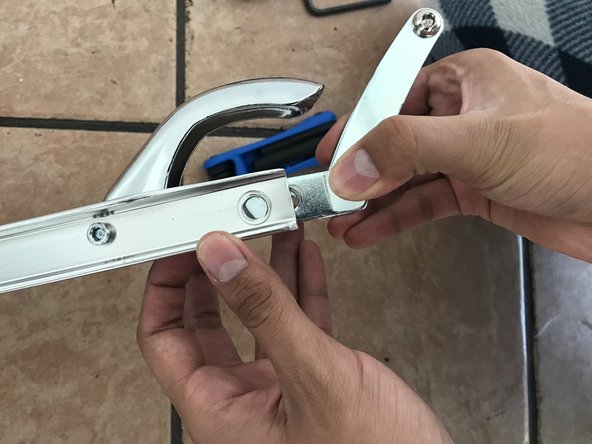
Place the 5 mm Hex Security key into the screw, and secure the other side of the screw with another 5 mm Hex Security key to keep it from spinning around.
-
Remove the screw using the 5 mm Hex Security key.
-
Remove the screw from the scooter frame.
 Ask FixBot
-
-
-
Remove the wheel from the scooter slowly.
-
Remove the black wheel holders from the scooter frame.
-
-
-



To reassemble your device, follow these instructions in revise order.

Team

CSU Los Angeles, Team 1-5, Briggs Fall 2022 Member of CSU Los Angeles, Team 1-5, Briggs Fall 2022
CSULA-BRIGGS-F22S1G5
1 Member
12 Guides authored
