Introduction
This guide will show you how to replace the reflector of the Razer Orochi V2. The reflector is needed to direct light from the sensor to the tracking surface, and is necessary for consistent tracking. You may want to replace the reflector if you're experiencing cursor skipping, a lack of cursor response, or if the lens is dirty. You should be careful when handling a reflector as its a delicate component and you do not want to scratch or damage it. Overall this is not a very difficult replacement to perform and as long as caution is used you shouldn't have much difficulty with any steps.
What you need
-
-
-
-
Remove the four 4 mm screws that secure the top cover using a 1.5mm Hex Screwdriver.
-
-
-
-
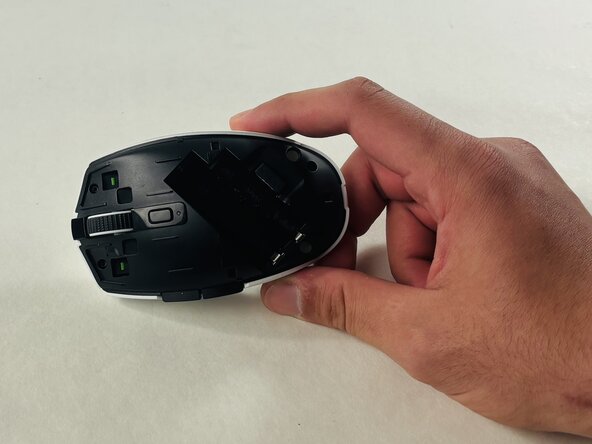
Position the plastic opening tool above the side buttons and lift to remove the top cover.
-
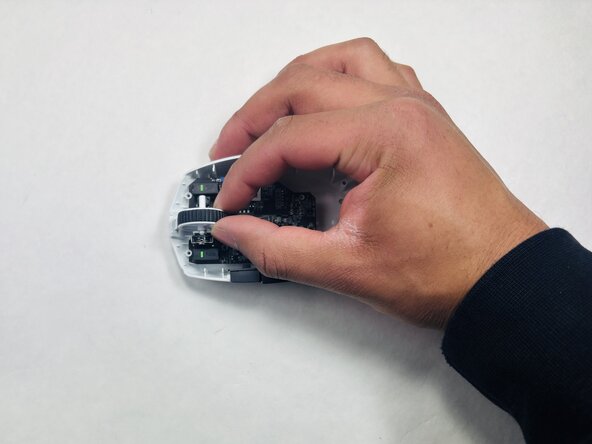
Disconnect the bundled cable connector, by pulling gripping all of the wires and gently pulling, rocking side to side until the connector comes out of the socket.
-
-
-
Remove the three 2.5mm screws that secure the circuit board using a Phillips #000 screwdriver.
-
-
-
-
-
-
Take the reflector out of the baseplate, and replace it with a new one.
-
-


 Ask FixBot




To reassemble your device, follow these instructions in reverse order.

Team

UMass Dartmouth, Team 1-5, Evans Spring 2026 Member of UMass Dartmouth, Team 1-5, Evans Spring 2026
UMASSD-EVANS-S26S1G5
4 Members
60 Guides authored
