Free Shipping on Domestic Orders $75+

Razer Naga Trinity LK-E5 Optical Encoder Replacement

What you need

  1. Razer Naga Trinity LK-E5 Optical Encoder Replacement, Razer Naga Trinity Disassembly: step 1, image 1 of 2 Razer Naga Trinity LK-E5 Optical Encoder Replacement, Razer Naga Trinity Disassembly: step 1, image 2 of 2
    • Remove the interchangeable side plate.

    Ask FixBot

    Add Comment

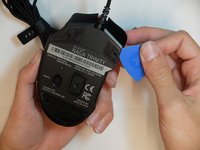
  2. Razer Naga Trinity LK-E5 Optical Encoder Replacement: step 2, image 1 of 2 Razer Naga Trinity LK-E5 Optical Encoder Replacement: step 2, image 2 of 2
    • Remove the mouse's feet using the opening pick.

    Ask FixBot

    Add Comment

  3. Razer Naga Trinity LK-E5 Optical Encoder Replacement: step 3, image 1 of 1
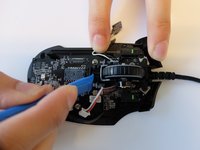
    • Remove the four 6mm screws by using a JIS #1 screwdriver.

    Ask FixBot
    Add Comment

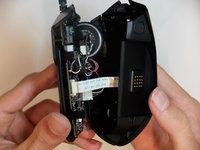
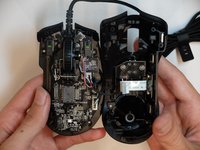
  4. Razer Naga Trinity LK-E5 Optical Encoder Replacement: step 4, image 1 of 2 Razer Naga Trinity LK-E5 Optical Encoder Replacement: step 4, image 2 of 2
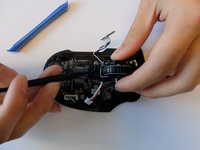
    • Separate the top mouse housing from the bottom mouse housing using the opening pick.

    • Be careful not to tug too hard on the ribbon connector.

    Ask FixBot
    Add Comment

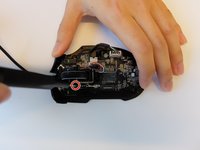
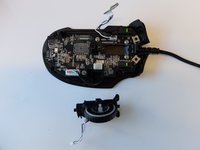
  5. Razer Naga Trinity LK-E5 Optical Encoder Replacement: step 5, image 1 of 1
    • Unlock the ribbon connector that is held down by the main board clips using the spudger's pointed end.

    Ask FixBot
    Add Comment

  6. Razer Naga Trinity LK-E5 Optical Encoder Replacement: step 6, image 1 of 1
    • Remove the side housing using the opening pick.

    Ask FixBot

    Add Comment

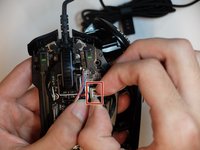
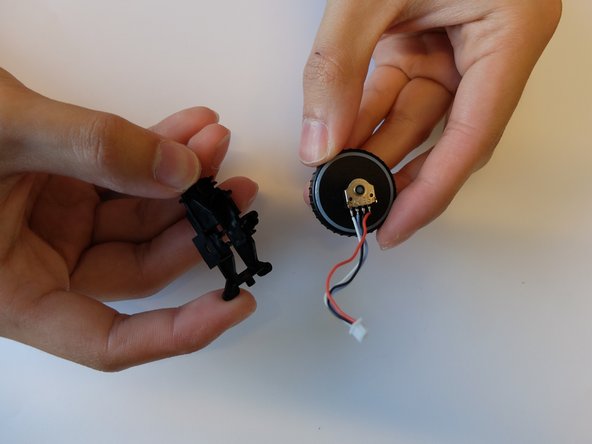
  7. Razer Naga Trinity LK-E5 Optical Encoder Replacement: step 7, image 1 of 2 Razer Naga Trinity LK-E5 Optical Encoder Replacement: step 7, image 2 of 2
    • Remove the top housing LED 3-Pin connector that is near the main board.

    Ask FixBot
    Add Comment

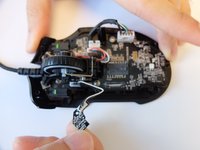
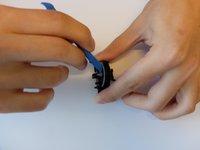
  8. Razer Naga Trinity LK-E5 Optical Encoder Replacement, Scroll Wheel Housing: step 8, image 1 of 2 Razer Naga Trinity LK-E5 Optical Encoder Replacement, Scroll Wheel Housing: step 8, image 2 of 2
    • Remove one 4mm black Phillips #000 screw from the left side of the mouse holding the scroll wheel LED controller board.

    • Then pull the LED controller board upwards and out.

    Ask FixBot
    Add Comment

  9. Razer Naga Trinity LK-E5 Optical Encoder Replacement: step 9, image 1 of 1
    Tool used on this step:
    Halberd Spudger
    $2.99
    Buy
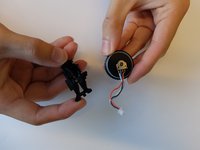
    • Pry and remove the scroll wheel feedback bar from its hold-down clips using the hook end of a halberd spudger.

    Ask FixBot
    Add Comment

  10. Razer Naga Trinity LK-E5 Optical Encoder Replacement: step 10, image 1 of 1
    Tool used on this step:
    Tweezers
    $3.99
    Buy
    • Remove the scroll wheel feedback bar from the scroll wheel by holding down the spring and using angled tweezers to remove it from its placement.

    Ask FixBot

    Add Comment
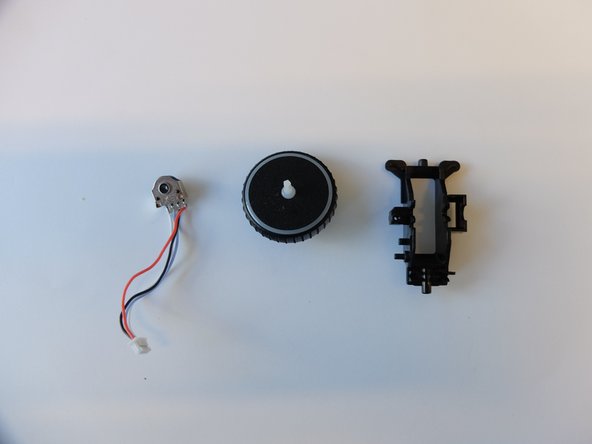
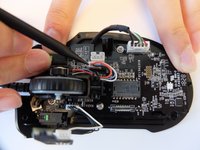
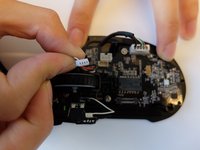
  11. Razer Naga Trinity LK-E5 Optical Encoder Replacement: step 11, image 1 of 2 Razer Naga Trinity LK-E5 Optical Encoder Replacement: step 11, image 2 of 2
    • Remove the scroll wheel optical encoder 3-pin connector from the main board by wiggling the connector upwards.

    Ask FixBot

    Add Comment

  12. Razer Naga Trinity LK-E5 Optical Encoder Replacement: step 12, image 1 of 3 Razer Naga Trinity LK-E5 Optical Encoder Replacement: step 12, image 2 of 3 Razer Naga Trinity LK-E5 Optical Encoder Replacement: step 12, image 3 of 3
    • Using the opening tool, pry the black bracket holding the scroll wheel in place backwards until the scroll wheel housing pops out.

    Ask FixBot

    Add Comment

  13. Razer Naga Trinity LK-E5 Optical Encoder Replacement, LK-E5 Optical Encoder: step 13, image 1 of 2 Razer Naga Trinity LK-E5 Optical Encoder Replacement, LK-E5 Optical Encoder: step 13, image 2 of 2
    • Remove the scroll wheel from the scroll wheel housing using the opening tool.

    Ask FixBot

    Add Comment

  14. Razer Naga Trinity LK-E5 Optical Encoder Replacement: step 14, image 1 of 2 Razer Naga Trinity LK-E5 Optical Encoder Replacement: step 14, image 2 of 2
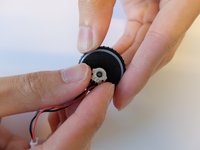
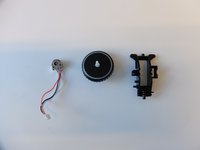
    • Remove the scroll wheel optical encoder from the scroll wheel.

    Ask FixBot

    Add Comment

Conclusion

To reassemble your device, follow these instructions in reverse order.

Cancel: I did not complete this guide.

One other person completed this guide.

1 Guide Comment

Where can we buy a replacement from?

Daniel - Reply Share

Add Comment

View Statistics:

Past 24 Hours: 5

Past 7 Days: 11

Past 30 Days: 72

All Time: 3,452