
Razer Deathadder Elite Scroll Wheel Replacement

Hamilton Liu and 2 other contributors
Last updated on Oct 9, 2024
Views: 8.4K
View statistics:
- Past 24 Hours:
- 11
- Past 7 Days:
- 61
- Past 30 Days:
- 220
- All Time:
- 8,375
Comments: 3
2 comments on steps, 1 guide comment.
Go to guide commentsCompleted: 8 9
8 people have marked this guide "completed." Will you be next?
9 people have marked this guide "completed." Including you — great job!
Favorites: 0 1
No one has favorited (and subscribed to) this guide. Will you be the first?
1 person has favorited (and subscribed to) this guide — and that's you!
Introduction
Go to step 1 ↓If your Razer Deathadder Elite has experienced a detached mouse wheel, it can inhibit the functions of the mouse. The following tutorial would be used to help people who encounter this issue and don't want to purchase a replacement mouse.
Make sure you really do have a misaligned scroll wheel by shaking your mouse to listen for any rattling around the mouse wheel. Double check to make sure the middle mouse click buttons are working properly as well.
Don't worry about breaking anything because all parts of the mouse are durable and easily removable.
Before beginning, make sure to unplug your mouse from whatever device it may be attached to.
What you need
Tools

-
-
-
Pry the skate off the two upper screws.
-
Remove the two upper screws using a Phillips #00 screwdriver.
-
Poke a hole with your screwdriver into the product sticker on the bottom of the mouse.
-
Remove the bottom screw using a Phillips #00 screwdriver.
 Ask FixBot
-
-
-
Lift up the upper shell of the mouse.
-
Detach the two wired connectors from the circuit board.
-
-
-


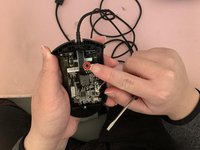
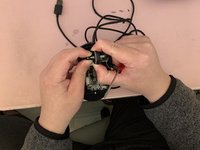


To reassemble your device, follow these instructions in reverse order.
Cancel: I did not complete this guide.
8 other people completed this guide.

Team

CSU Los Angeles, Team 2-76, Briggs Fall 2022 Member of CSU Los Angeles, Team 2-76, Briggs Fall 2022
CSULA-BRIGGS-F22S2G76
1 Member
12 Guides authored
1 Guide Comment
Hi! What size and manufacturer is the encoder in this mouse?
