Free Shipping on Domestic Orders $75+

Razer DeathStalker V2 Pro TKL Key Switch Replacement

What you need

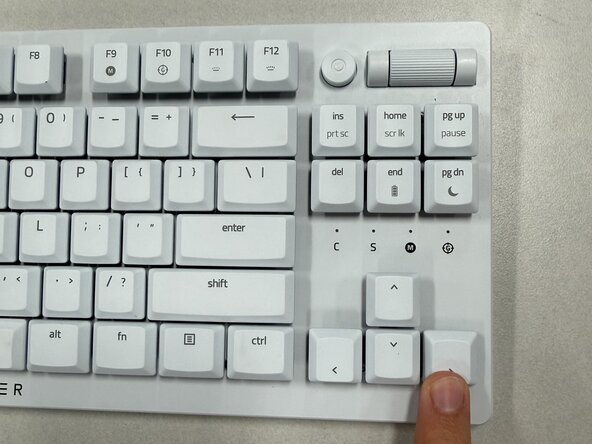
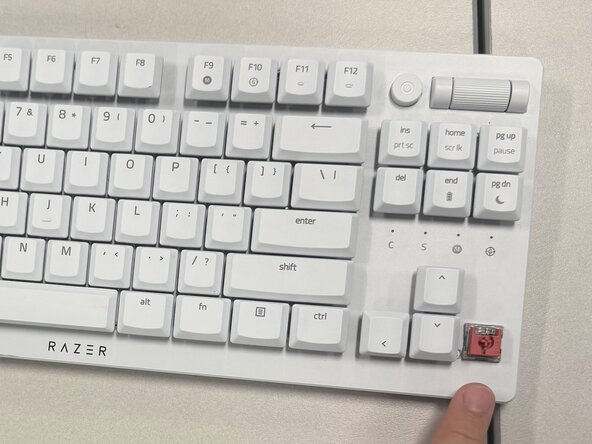
  1. Razer DeathStalker V2 Pro TKL Key Switch Replacement, Razer DeathStalker V2 Pro TKL Switch Replacement: step 1, image 1 of 3 Razer DeathStalker V2 Pro TKL Key Switch Replacement, Razer DeathStalker V2 Pro TKL Switch Replacement: step 1, image 2 of 3 Razer DeathStalker V2 Pro TKL Key Switch Replacement, Razer DeathStalker V2 Pro TKL Switch Replacement: step 1, image 3 of 3
    • Place two fingers on the top and the bottom of the key that needs to be replaced, gently grasp and lift the key.

    • Use a key cap puller if it's difficult to remove the keys by hand.

    Ask FixBot

    Add Comment

  2. Razer DeathStalker V2 Pro TKL Key Switch Replacement: step 2, image 1 of 2 Razer DeathStalker V2 Pro TKL Key Switch Replacement: step 2, image 2 of 2
    • Use a switch puller to remove the switch from the keyboard.

    • Press the puller over the switch until it clicks into place.

    • Gently lift upward to release the switch from the socket.

    • After removing the switch, check for dust and debris. Use a dust blower to clear loose dust, then gently clean beneath the switch with a microfiber cloth or cotton swab dampened with 90% or higher isopropyl alcohol before reinstalling it.

    Ask FixBot

    Add Comment

Conclusion

To reassemble your device, follow these instructions in reverse order. Take your e-waste to an R2 or e-Stewards certified recycler.

Cancel: I did not complete this guide.

Karmelyn Olivas

Member since: 02/10/26

135 Reputation

1 Guide authored

Team

Texas Tech, Team 11-1, Weston Spring 2026 Member of Texas Tech, Team 11-1, Weston Spring 2026

TTU-WESTON-S26S11G1

5 Members

2 Guides authored

0 Guide Comments

Add Comment

View Statistics:

Past 24 Hours: 2

Past 7 Days: 13

Past 30 Days: 72

All Time: 156